# Plans and pricing
> Pay as you go from a $5 top-up, or Personal at $5 and Team at $20 a month. Metered per minute, with flat-priced boxes for databases, caches and steady apps.
Ownkube bills from a **prepaid wallet**. Top it up yourself on Pay as you go, or let a plan load credit every month. Apps draw the wallet down per minute for the CPU and memory they actually use; databases, caches and reserved boxes draw it at a flat rate while they run. Nothing here needs a cloud account.
## Plans
### Pay as you go
**No subscription.**
- Top up the wallet from **\$5** (up to \$25 per top-up and \$50 per 30 days)
- Up to **10 services** within 2 vCPU / 4 GiB in total
- Metered or Spark boxes; the three smallest database and cache boxes
- Build minutes billed from the first minute; rollback to the last 3 builds
- 7 days of logs and metrics, 50 GB / month bandwidth cap
- One organization, owner only; community support
### Personal
**\$5 / month.**
- Loads **\$5 of wallet credit** each month
- Up to **50 services** within 8 vCPU / 16 GiB
- **300 build minutes** included, then \$0.007 / min
- Core boxes, every database and cache size, 7-day database backups
- Rollback to the last 10 builds, 30 days of logs and metrics
- One organization; community support
### Team
**\$20 / month.**
- Loads **\$20 of wallet credit** each month
- Up to **50 services** within 32 vCPU / 64 GiB
- **1,500 build minutes** included, then \$0.005 / min, the Large builder and priority builds
- Standby database replicas and Dedicated databases
- Unlimited organizations, organization roles, shared billing
- 90 days of logs and metrics; email support
Pick a plan or top up on the [Billing page](https://app.ownkube.io/dashboard/billing), or from the terminal with `okctl billing subscribe personal` and `okctl billing top-up 10`. Enterprise is custom and not self-serve: [contact us](mailto:support@ownkube.io?subject=Enterprise).
### How the limits count
The service limit counts every service of any kind, sleeping or not. The vCPU and memory limit counts each service at its CPU and memory limits (or its box size), times its replicas:
- **Always-on services add up.** Workers, and web apps, databases and caches with sleep turned off.
- **Services that can sleep count once, at the largest one's size.** Web apps, databases and caches with sleep turned on, plus jobs and functions. Any one of them can always wake within your plan, so ten sleeping apps fit where ten always-on ones would not.
Limits are checked when you create or change a service, never when one wakes. Turning sleep off on a service counts it as always-on from then on.
### How the wallet works
On Pay as you go you top up the wallet yourself; on a plan it loads credit monthly. Per-minute usage draws it down. **Unused wallet credit rolls over and never expires**: the dollar balance stays on your account and each monthly load adds to it, so a light month is not wasted. The monthly build-minutes allowance is the exception; it resets each month and does not roll over.
Run past the loaded credit and you can **top up any time** (any amount from \$5) to keep going. When the balance reaches zero the account is **suspended with its data retained**: every service stops, nothing is deleted, the owner gets a daily reminder, and adding credit or the next monthly load resumes everything. An account left suspended for exhaustion for 7 days has its Compute resources deleted, so top up or set a [spend limit](/docs/billing/cost-control#spend-limits) that pauses before the wallet runs dry. A budget pause never deletes anything.
## What you are billed for
| Line | How it meters |
|---|---|
| CPU | Actual per-minute usage, up to the limit you set. A mostly-idle app barely registers. |
| Memory | The working set the app actually holds, per minute, for as long as it runs. |
| Reserved boxes | A flat monthly price while the box runs, busy or idle. Asleep, a box bills only its storage. |
| Databases | Always a flat-priced box while running, plus storage at **\$0.25 / GB / month** per replica. A sleeping database bills storage only. |
| Caches | Always a flat-priced box while running. No storage charge; a sleeping cache bills nothing. |
| Build minutes | Time spent building from source, by the minute. Plans include an allowance. |
| Bandwidth | Outbound traffic per GB at the region's rate: **\$0.13 / GB** in the Mumbai region, **\$0.02 / GB** in the Germany region. Inbound and in-region traffic are free. |
Metered rates are about **\$18 per vCPU and \$4.50 per GiB a month** (\$0.00041 / vCPU-minute and \$0.0001 / GiB-minute). You set a CPU limit and a memory limit per workload, or take a preset. These are ceilings, not a fixed price: the bill follows the meter, not the size you pick. The live meter is on the [Usage page](/docs/billing/usage).
## Reserved boxes
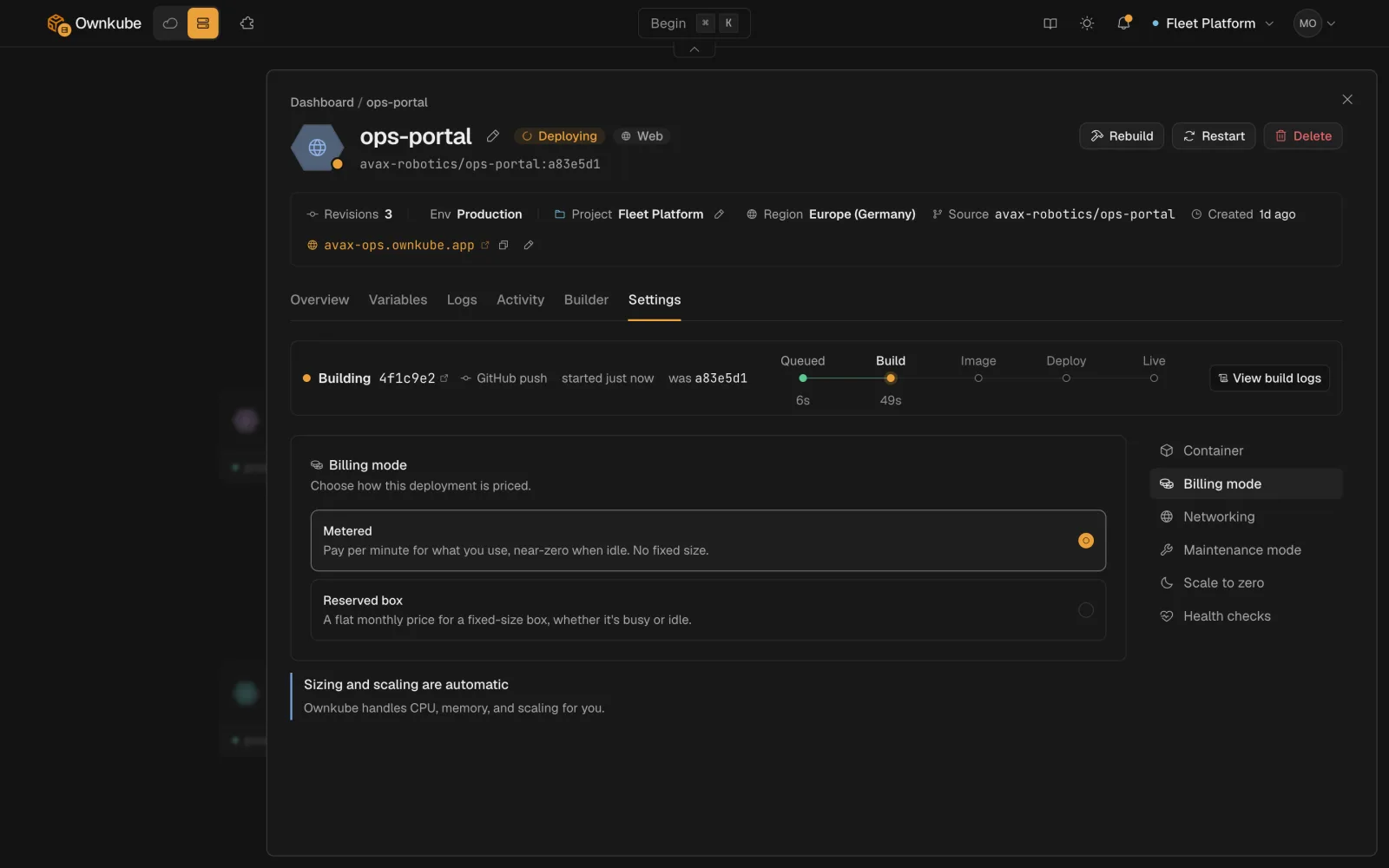
Metered is the default and fits most personal software. A workload that runs flat-out all month, or that needs guaranteed CPU, can opt into a **reserved box**: a fixed-size compute box at a flat monthly price. Switch on the deployment's **Settings** tab under **Billing mode**, or set `billingMode` to `reserved` with a `skuId` in a manifest.
 - **Spark** boxes are for small, bursty apps. Spark is how a small app fits in a \$5 box, and it is available on every tier.
- **Core** boxes have dedicated vCPU and need a Personal or Team plan.
| Box | vCPU | Memory | Price |
|---|---|---|---|
| **Spark 1** | 0.25 vCPU | 0.5 GiB | **\$5 / mo** |
| **Spark 2** | 0.5 vCPU | 1 GiB | **\$10 / mo** |
| **Spark 3** | 1 vCPU | 2 GiB | **\$19 / mo** |
| **Core 2** | 2 vCPU (dedicated) | 4 GiB | **\$58 / mo** |
| **Core 4** | 4 vCPU (dedicated) | 8 GiB | **\$116 / mo** |
| **Core 8** | 8 vCPU (dedicated) | 16 GiB | **\$232 / mo** |
| **Core 2-Mem** | 2 vCPU (dedicated) | 8 GiB | **\$76 / mo** |
| **Core 4-Mem** | 4 vCPU (dedicated) | 16 GiB | **\$152 / mo** |
`okctl boxes list --kind web` prints the same table with the ids a manifest takes.
## Databases
Managed Postgres is always a flat-priced box plus storage. The three smallest boxes are available on every tier. DB 4 and up need a plan. Dedicated boxes, with a dedicated vCPU, need Team.
| Box | Price | Tier |
|---|---|---|
| **DB 0.5** | **\$4 / mo** | every tier |
| **DB 1** | **\$8 / mo** | every tier |
| **DB 2** | **\$12 / mo** | every tier |
| **DB 4** | **\$28 / mo** | Personal and Team |
| **DB 8** | **\$54 / mo** | Personal and Team |
| **DB 16** | **\$104 / mo** | Personal and Team |
| **Dedicated 4 / 8 / 16** | **\$48 / \$96 / \$192 / mo** | Team |
Storage is **\$0.25 / GB / month** per replica, and a standby replica doubles the box price. Backups with 7-day point-in-time recovery are included on Personal and Team, off by default and turned on per database. Specs for each box are on the [Postgres page](/docs/data/postgres#sizes).
Valkey caches run from **\$2 / mo** (0.25 GiB) to **\$16 / mo** (4 GiB), with the 0.25, 0.5 and 1 GiB boxes on every tier and the larger ones on a plan. See [Valkey sizes](/docs/data/valkey#sizes).
## Build minutes
Building from source (a repository or `okctl up`) is billed by the minute while the builder runs. Pulling a pre-built image costs nothing.
| Tier | Included build minutes / mo | Rate past the allowance |
|---|---|---|
| **Pay as you go** | none | \$0.01 / build minute, 15-minute cap per build |
| **Personal** (\$5 / mo) | 300 | \$0.007 / build minute |
| **Team** (\$20 / mo) | 1,500 | \$0.005 / build minute |
The Small and Standard builders are available on every tier; the **Large** builder and priority build capacity come with Team. Pick the builder on the deployment's **Builder** tab. See [Builds](/docs/deployments/builds).
## How Ownkube compares
Approximate, as of October 2026. Competitor figures are their published list prices.
| Dimension | Ownkube | Heroku | Railway | Render |
|---|---|---|---|---|
| Starting price | No plan, top up from \$5 | \$5 / mo (Eco) | \$5 / mo (Hobby) | \$7 / mo (Starter) |
| Pricing model | Metered per minute | Fixed dyno tiers | Metered per minute | Fixed instance tiers |
| Idle app cost | Nothing while asleep | Dynos sleep on Eco | Low, metered | Free tier sleeps |
| Managed Postgres | Built in | Add-on | Built in | Built in |
| Managed Redis-compatible cache | Built in (Valkey) | Add-on | Built in | Built in |
| Horizontal autoscaling | Included | Add-on or manual | Limited | Paid plans |
| Run in your own AWS | Yes | No | No | No |
## Running in your own cloud
The same app can run in your own AWS account: a **Starter** cluster is free of any Ownkube fee (you pay AWS for one instance), and a **Production (EKS)** cluster is **\$5 / vCPU + \$1 / GiB RAM a month** on what your deployments request. See [Clusters](/docs/own-cloud/clusters).
## FAQ
- **Spark** boxes are for small, bursty apps. Spark is how a small app fits in a \$5 box, and it is available on every tier.
- **Core** boxes have dedicated vCPU and need a Personal or Team plan.
| Box | vCPU | Memory | Price |
|---|---|---|---|
| **Spark 1** | 0.25 vCPU | 0.5 GiB | **\$5 / mo** |
| **Spark 2** | 0.5 vCPU | 1 GiB | **\$10 / mo** |
| **Spark 3** | 1 vCPU | 2 GiB | **\$19 / mo** |
| **Core 2** | 2 vCPU (dedicated) | 4 GiB | **\$58 / mo** |
| **Core 4** | 4 vCPU (dedicated) | 8 GiB | **\$116 / mo** |
| **Core 8** | 8 vCPU (dedicated) | 16 GiB | **\$232 / mo** |
| **Core 2-Mem** | 2 vCPU (dedicated) | 8 GiB | **\$76 / mo** |
| **Core 4-Mem** | 4 vCPU (dedicated) | 16 GiB | **\$152 / mo** |
`okctl boxes list --kind web` prints the same table with the ids a manifest takes.
## Databases
Managed Postgres is always a flat-priced box plus storage. The three smallest boxes are available on every tier. DB 4 and up need a plan. Dedicated boxes, with a dedicated vCPU, need Team.
| Box | Price | Tier |
|---|---|---|
| **DB 0.5** | **\$4 / mo** | every tier |
| **DB 1** | **\$8 / mo** | every tier |
| **DB 2** | **\$12 / mo** | every tier |
| **DB 4** | **\$28 / mo** | Personal and Team |
| **DB 8** | **\$54 / mo** | Personal and Team |
| **DB 16** | **\$104 / mo** | Personal and Team |
| **Dedicated 4 / 8 / 16** | **\$48 / \$96 / \$192 / mo** | Team |
Storage is **\$0.25 / GB / month** per replica, and a standby replica doubles the box price. Backups with 7-day point-in-time recovery are included on Personal and Team, off by default and turned on per database. Specs for each box are on the [Postgres page](/docs/data/postgres#sizes).
Valkey caches run from **\$2 / mo** (0.25 GiB) to **\$16 / mo** (4 GiB), with the 0.25, 0.5 and 1 GiB boxes on every tier and the larger ones on a plan. See [Valkey sizes](/docs/data/valkey#sizes).
## Build minutes
Building from source (a repository or `okctl up`) is billed by the minute while the builder runs. Pulling a pre-built image costs nothing.
| Tier | Included build minutes / mo | Rate past the allowance |
|---|---|---|
| **Pay as you go** | none | \$0.01 / build minute, 15-minute cap per build |
| **Personal** (\$5 / mo) | 300 | \$0.007 / build minute |
| **Team** (\$20 / mo) | 1,500 | \$0.005 / build minute |
The Small and Standard builders are available on every tier; the **Large** builder and priority build capacity come with Team. Pick the builder on the deployment's **Builder** tab. See [Builds](/docs/deployments/builds).
## How Ownkube compares
Approximate, as of October 2026. Competitor figures are their published list prices.
| Dimension | Ownkube | Heroku | Railway | Render |
|---|---|---|---|---|
| Starting price | No plan, top up from \$5 | \$5 / mo (Eco) | \$5 / mo (Hobby) | \$7 / mo (Starter) |
| Pricing model | Metered per minute | Fixed dyno tiers | Metered per minute | Fixed instance tiers |
| Idle app cost | Nothing while asleep | Dynos sleep on Eco | Low, metered | Free tier sleeps |
| Managed Postgres | Built in | Add-on | Built in | Built in |
| Managed Redis-compatible cache | Built in (Valkey) | Add-on | Built in | Built in |
| Horizontal autoscaling | Included | Add-on or manual | Limited | Paid plans |
| Run in your own AWS | Yes | No | No | No |
## Running in your own cloud
The same app can run in your own AWS account: a **Starter** cluster is free of any Ownkube fee (you pay AWS for one instance), and a **Production (EKS)** cluster is **\$5 / vCPU + \$1 / GiB RAM a month** on what your deployments request. See [Clusters](/docs/own-cloud/clusters).
## FAQ
Do I need a plan to start?
No. Pay as you go has no subscription: top up the wallet from \$5 and deploy. A plan loads credit each month and unlocks more services, Core boxes, every database size, backups and included build minutes.
Can I cap my monthly spend?
Yes. Set a monthly budget and choose to be notified or to have everything pause at the cap. Alerts email the owner at 50%, 80% and 100%. See [Spend limits](/docs/billing/cost-control#spend-limits).
What does an idle app cost?
Almost nothing on the meter, and nothing at all once it [sleeps](/docs/deployments/sleep). A sleeping database bills only its storage; a sleeping cache or box bills nothing.
Can I move between Ownkube Compute and my own cloud later?
Yes. The deployment configuration is the same on both, so the same app runs in your AWS account with no rewrite and the same dashboard. See [Own cloud](/docs/own-cloud).
- [Usage](/docs/billing/usage)
- [Cost control](/docs/billing/cost-control)
- [Organizations](/docs/organizations)
---
**Don't see a feature you need?** Email [support@ownkube.io](mailto:support@ownkube.io?subject=Feature%20request). Ownkube is shaped by the teams using it and we ship what our users ask for.
## Search
This site has a search endpoint: https://context7.com/api/v2/ask?siteKey=ask_c64dfe8ffaa8d3ad19576838&query=. It returns documentation that answers the question, with a source link for each part. No API key is needed. If nothing matches, it says so.