# Usage and the wallet
> Read your wallet balance, the live hourly burn, this month's projected cost and every metered line on the Billing page or with okctl usage.
The [Billing page](https://app.ownkube.io/dashboard/billing) shows what you have, what you are burning right now, and where the month is heading. Everything on it draws from one prepaid wallet, so there is a single number to watch.
 ## Wallet balance and this month
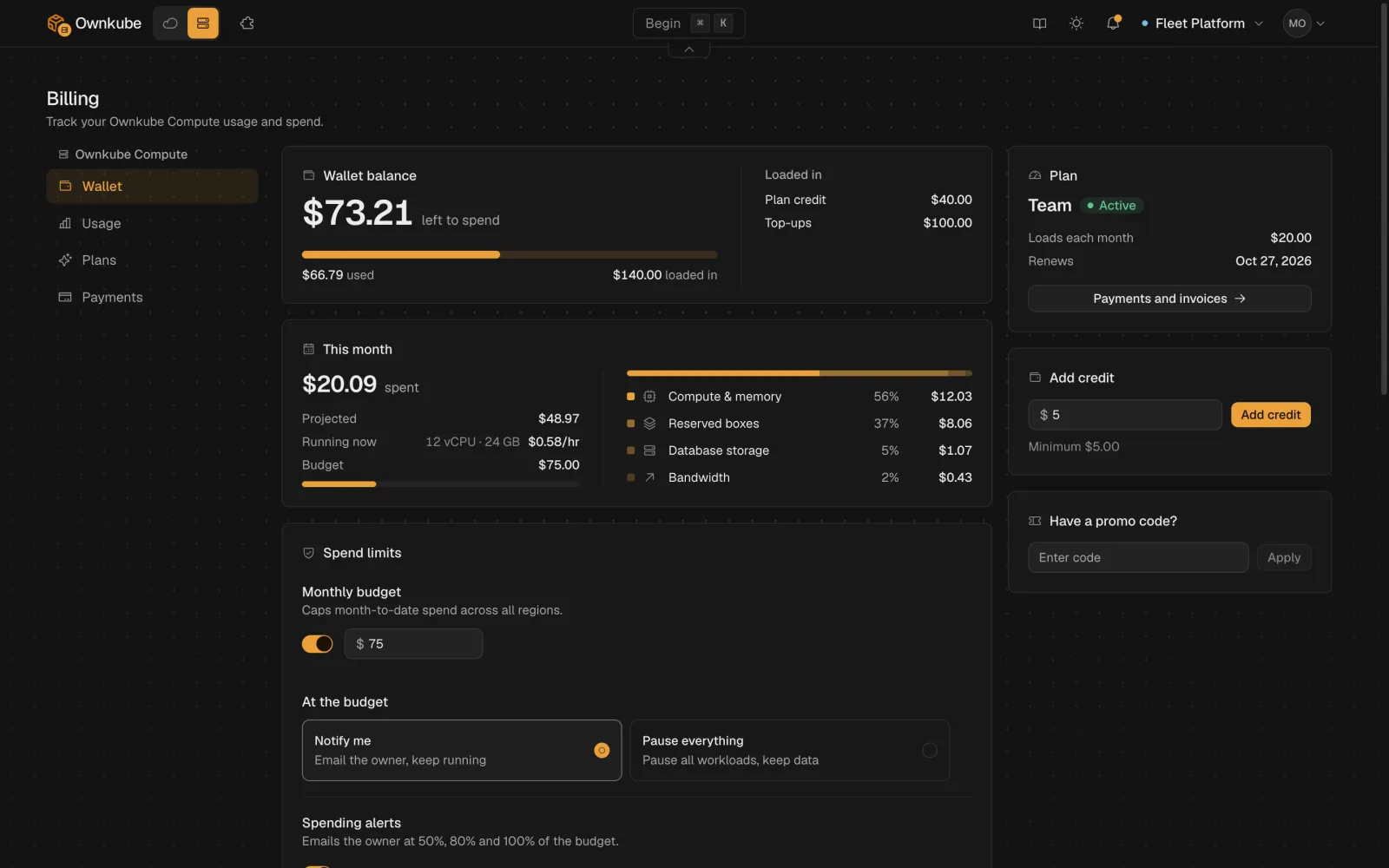
The **Wallet balance** card is the credit left to spend. Below it, **This month** shows three figures:
| Figure | What it means |
|---|---|
| **Running now** | The hourly burn rate of everything running at this moment. Scale something down and it drops within minutes. |
| **Projected** | Month-to-date spend extended in a straight line to the end of the month. |
| **Budget** | The monthly cap from [spend limits](/docs/billing/cost-control#spend-limits), if you set one. |
Top up from the **Add credit** card on the same page. On a plan the wallet also loads automatically on each billing cycle, and unused credit rolls over. See [How the wallet works](/docs/billing/plans#how-the-wallet-works).
## Usage lines
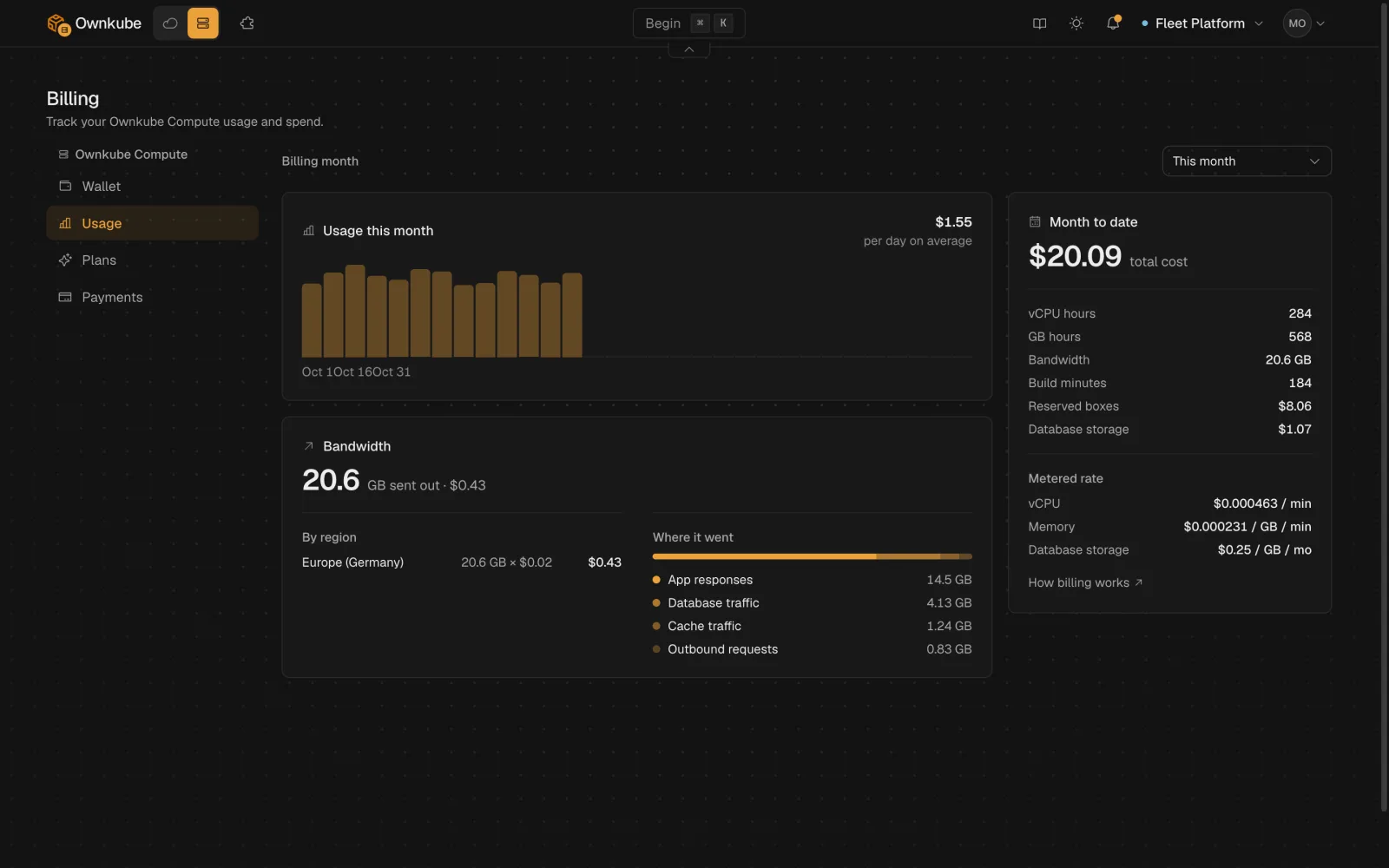
The **Usage** section breaks the month into the lines you are billed for. Each row shows the quantity so far and its cost.
## Wallet balance and this month
The **Wallet balance** card is the credit left to spend. Below it, **This month** shows three figures:
| Figure | What it means |
|---|---|
| **Running now** | The hourly burn rate of everything running at this moment. Scale something down and it drops within minutes. |
| **Projected** | Month-to-date spend extended in a straight line to the end of the month. |
| **Budget** | The monthly cap from [spend limits](/docs/billing/cost-control#spend-limits), if you set one. |
Top up from the **Add credit** card on the same page. On a plan the wallet also loads automatically on each billing cycle, and unused credit rolls over. See [How the wallet works](/docs/billing/plans#how-the-wallet-works).
## Usage lines
The **Usage** section breaks the month into the lines you are billed for. Each row shows the quantity so far and its cost.
 | Line | Unit | Notes |
|---|---|---|
| **vCPU hours** | vCPU-hours | Metered on actual CPU use, per minute, for apps on the meter. |
| **GB hours** | GiB-hours | Metered on the memory working set apps hold. |
| **Reserved boxes** | box-hours | Flat-priced Spark, Core, database and cache boxes, billed while they run. |
| **Database storage** | GB-months | Per-GB storage held by your databases, including standby replicas. |
| **Build minutes** | minutes | Source builds, with the plan allowance deducted first. |
| **Bandwidth** | GB | Outbound traffic at the region's rate, split into what apps send to visitors, what they send to other services, and what public databases and caches send to external clients. |
The **Usage history** chart underneath plots daily spend for the month, and shows "No usage recorded yet this month" until the first metered minute lands. Rates for every line are on [Plans and pricing](/docs/billing/plans#what-you-are-billed-for).
## From the terminal
`okctl usage` prints the same figures for scripts and coding agents.
```bash
okctl usage current # live hourly burn rate
okctl usage month-to-date # spend so far this month, by line
okctl usage projected # straight-line projection for the month
okctl usage history # daily points; add -o json for full detail
okctl billing wallet # prepaid wallet balance
```
To add credit or change plan without opening the dashboard:
```bash
okctl billing top-up 10 # opens a checkout for a $10 top-up
okctl billing subscribe personal # or team
okctl billing portal # payment methods and invoices
okctl billing redeem
| Line | Unit | Notes |
|---|---|---|
| **vCPU hours** | vCPU-hours | Metered on actual CPU use, per minute, for apps on the meter. |
| **GB hours** | GiB-hours | Metered on the memory working set apps hold. |
| **Reserved boxes** | box-hours | Flat-priced Spark, Core, database and cache boxes, billed while they run. |
| **Database storage** | GB-months | Per-GB storage held by your databases, including standby replicas. |
| **Build minutes** | minutes | Source builds, with the plan allowance deducted first. |
| **Bandwidth** | GB | Outbound traffic at the region's rate, split into what apps send to visitors, what they send to other services, and what public databases and caches send to external clients. |
The **Usage history** chart underneath plots daily spend for the month, and shows "No usage recorded yet this month" until the first metered minute lands. Rates for every line are on [Plans and pricing](/docs/billing/plans#what-you-are-billed-for).
## From the terminal
`okctl usage` prints the same figures for scripts and coding agents.
```bash
okctl usage current # live hourly burn rate
okctl usage month-to-date # spend so far this month, by line
okctl usage projected # straight-line projection for the month
okctl usage history # daily points; add -o json for full detail
okctl billing wallet # prepaid wallet balance
```
To add credit or change plan without opening the dashboard:
```bash
okctl billing top-up 10 # opens a checkout for a $10 top-up
okctl billing subscribe personal # or team
okctl billing portal # payment methods and invoices
okctl billing redeem # apply a promo code
```
Add `--no-browser` to any checkout command to print the URL instead of opening it.
## Who sees the bill
Billing is organization-wide. The organization **owner** pays and gets the alert and suspension emails. On Team, **admins** can also open the Billing page and manage payment; see [Organizations](/docs/organizations#roles). Own-cloud clusters bill separately, on their own section of the same page, and your AWS bill stays with AWS.
- [Plans and pricing](/docs/billing/plans)
- [Cost control](/docs/billing/cost-control)
- [Metrics](/docs/observability/metrics)
---
**Don't see a feature you need?** Email [support@ownkube.io](mailto:support@ownkube.io?subject=Feature%20request). Ownkube is shaped by the teams using it and we ship what our users ask for.
## Search
This site has a search endpoint: https://context7.com/api/v2/ask?siteKey=ask_c64dfe8ffaa8d3ad19576838&query=. It returns documentation that answers the question, with a source link for each part. No API key is needed. If nothing matches, it says so.