# Databases and caches
> Managed Postgres and Valkey on Ownkube. Create one in a click, link it to an app and Ownkube sets the connection variables. Private by default, with a built-in data console.
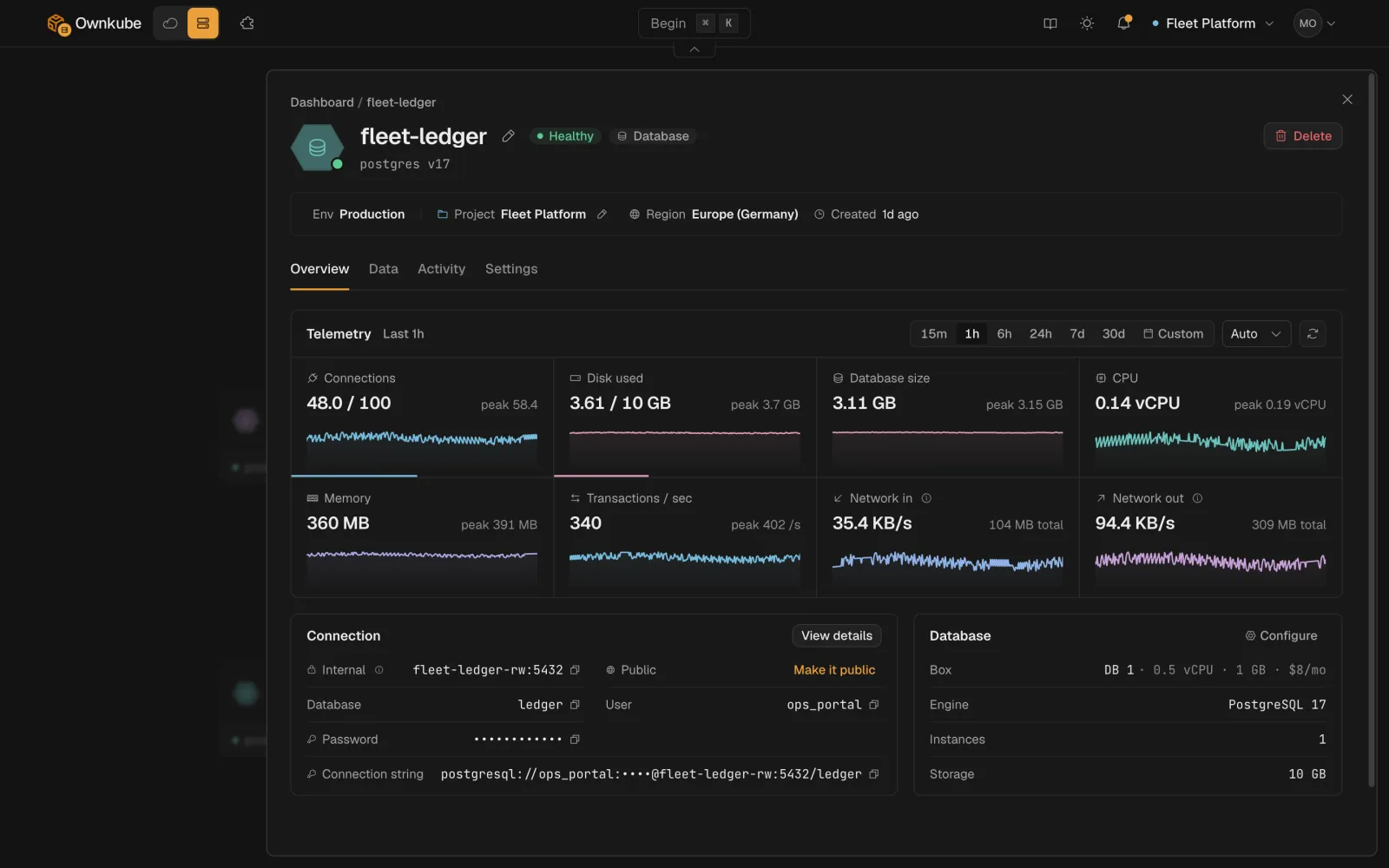
Ownkube runs two kinds of managed datastore: **Postgres** for data you keep, and **Valkey** (Redis-compatible) for data you cache. Both are [deployments](/docs/deployments) like your apps: they live in an [environment](/docs/deployments/environments), show up on the same dashboard, and bill from the same wallet.
 ## Pick the right one
| | Postgres | Valkey cache |
| --- | --- | --- |
| Keeps data | Yes, on a persistent volume with optional backups | No, in memory only. A restart is a cold cache |
| Typical use | Application data, users, orders, anything you must not lose | Sessions, rate limits, queues, cached queries |
| Sizes | DB 0.5 to DB 16, plus Dedicated boxes on Team | Cache 0.25 to Cache 4, by memory |
| Billing | Flat monthly box price plus storage at $0.25 per GB per month | Flat monthly box price, no storage |
| While asleep | Storage only | Nothing |
| Clients | Any Postgres driver | Any Redis-compatible client |
Full prices are on [Plans and pricing](/docs/billing/plans).
## How a datastore reaches your app
1. Create the database or cache in the same [environment](/docs/deployments/environments) as the app.
2. **Link** it to the app from the app's page, or run `okctl deploy link `.
3. Ownkube adds the connection string and credentials to the app as [secret variables](/docs/deployments/variables#variables-ownkube-sets-for-you) and rolls the app out.
The address in those variables is a [private network](/docs/networking/private) address. Nothing outside your environment can reach it. If you need to connect from your laptop, a CI runner or a GUI client, turn on **Public access** on the datastore or tunnel through [`okctl connect`](/docs/deployments/shell#connect-to-a-database-or-cache).
## What you get with every datastore
### Private by default
A new database or cache has no public address. Only apps in its environment can reach it. Public access is a per-datastore switch.
### Encrypted
Data is encrypted at rest. Public connections use TLS with a certificate issued for the datastore's own hostname.
### A data console
The **Data** tab browses tables and rows or cache keys and runs SQL or Valkey commands in the dashboard. See [Data console](/docs/data/console).
### Logs and activity
The same **Logs** and **Activity** tabs as an app, so you can see restarts, resizes and backup runs in one place.
### Sleep when idle
Turn on **Idle to zero** and a datastore nobody is connected to parks itself. The next connection wakes it, with data intact. See [Sleep and wake](/docs/deployments/sleep#databases-and-caches).
### Resize in place
Move to a bigger box or more storage from the **Settings** tab. The datastore restarts briefly; the data stays.
## Where datastores run
On Ownkube Compute a datastore runs in the [region](/docs/deployments/regions) you picked, next to the apps that use it. If you run in your own AWS account, the same database and cache types run on your [cluster](/docs/own-cloud/clusters): a Starter cluster runs a single instance, a Production (EKS) cluster can run standbys.
- [Postgres](/docs/data/postgres)
- [Valkey cache](/docs/data/valkey)
- [Data console](/docs/data/console)
---
**Don't see a feature you need?** Email [support@ownkube.io](mailto:support@ownkube.io?subject=Feature%20request). Ownkube is shaped by the teams using it and we ship what our users ask for.
## Search
This site has a search endpoint: https://context7.com/api/v2/ask?siteKey=ask_c64dfe8ffaa8d3ad19576838&query=. It returns documentation that answers the question, with a source link for each part. No API key is needed. If nothing matches, it says so.
## Pick the right one
| | Postgres | Valkey cache |
| --- | --- | --- |
| Keeps data | Yes, on a persistent volume with optional backups | No, in memory only. A restart is a cold cache |
| Typical use | Application data, users, orders, anything you must not lose | Sessions, rate limits, queues, cached queries |
| Sizes | DB 0.5 to DB 16, plus Dedicated boxes on Team | Cache 0.25 to Cache 4, by memory |
| Billing | Flat monthly box price plus storage at $0.25 per GB per month | Flat monthly box price, no storage |
| While asleep | Storage only | Nothing |
| Clients | Any Postgres driver | Any Redis-compatible client |
Full prices are on [Plans and pricing](/docs/billing/plans).
## How a datastore reaches your app
1. Create the database or cache in the same [environment](/docs/deployments/environments) as the app.
2. **Link** it to the app from the app's page, or run `okctl deploy link `.
3. Ownkube adds the connection string and credentials to the app as [secret variables](/docs/deployments/variables#variables-ownkube-sets-for-you) and rolls the app out.
The address in those variables is a [private network](/docs/networking/private) address. Nothing outside your environment can reach it. If you need to connect from your laptop, a CI runner or a GUI client, turn on **Public access** on the datastore or tunnel through [`okctl connect`](/docs/deployments/shell#connect-to-a-database-or-cache).
## What you get with every datastore
### Private by default
A new database or cache has no public address. Only apps in its environment can reach it. Public access is a per-datastore switch.
### Encrypted
Data is encrypted at rest. Public connections use TLS with a certificate issued for the datastore's own hostname.
### A data console
The **Data** tab browses tables and rows or cache keys and runs SQL or Valkey commands in the dashboard. See [Data console](/docs/data/console).
### Logs and activity
The same **Logs** and **Activity** tabs as an app, so you can see restarts, resizes and backup runs in one place.
### Sleep when idle
Turn on **Idle to zero** and a datastore nobody is connected to parks itself. The next connection wakes it, with data intact. See [Sleep and wake](/docs/deployments/sleep#databases-and-caches).
### Resize in place
Move to a bigger box or more storage from the **Settings** tab. The datastore restarts briefly; the data stays.
## Where datastores run
On Ownkube Compute a datastore runs in the [region](/docs/deployments/regions) you picked, next to the apps that use it. If you run in your own AWS account, the same database and cache types run on your [cluster](/docs/own-cloud/clusters): a Starter cluster runs a single instance, a Production (EKS) cluster can run standbys.
- [Postgres](/docs/data/postgres)
- [Valkey cache](/docs/data/valkey)
- [Data console](/docs/data/console)
---
**Don't see a feature you need?** Email [support@ownkube.io](mailto:support@ownkube.io?subject=Feature%20request). Ownkube is shaped by the teams using it and we ship what our users ask for.
## Search
This site has a search endpoint: https://context7.com/api/v2/ask?siteKey=ask_c64dfe8ffaa8d3ad19576838&query=. It returns documentation that answers the question, with a source link for each part. No API key is needed. If nothing matches, it says so.