# Valkey cache
> Managed Valkey, a Redis-compatible in-memory cache, in one click. Pick a memory size and eviction policy, link it to an app, and connect any Redis client unchanged.
Ownkube runs managed [Valkey](https://valkey.io/) as a **cache** deployment. Valkey is in-memory and Redis-compatible, so existing Redis client libraries connect unchanged. Use it for caching, sessions, rate limiting and background job queues.
 ## Create a cache
#### Dashboard
1. Press ⌘ K on the [dashboard](https://app.ownkube.io/dashboard) or click **New**, then choose **Cache**.
2. Pick a **box** by memory. See [Sizes](#sizes).
3. Pick the [environment](/docs/deployments/environments) and [region](/docs/deployments/regions) of the app that will use it.
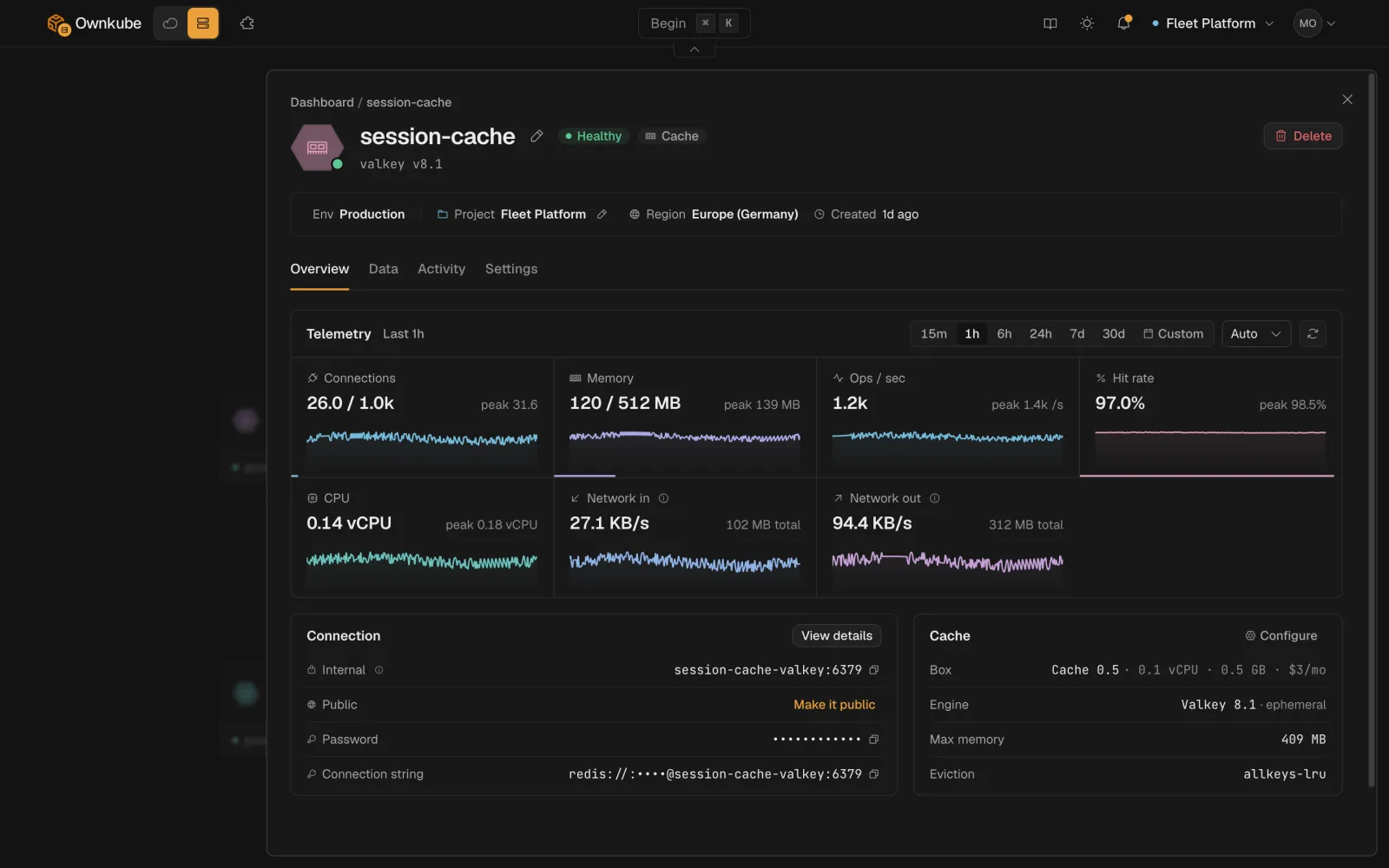
4. Click **Deploy**. The Overview tab shows the host, port, password and a ready-made connection string.
#### okctl
```bash
okctl deploy create -f cache.json
```
```json title="cache.json"
{
"resourceType": "cache",
"name": "app-cache",
"region": "asia",
"environmentId": "",
"config": {
"engine": "valkey",
"version": "8.1",
"skuId": "cache-0-5",
"maxmemoryPolicy": "allkeys-lru"
}
}
```
`okctl regions list` prints the region slugs, `okctl environments list` the environment ids and `okctl boxes list` the box ids.
## Connect an app
Link the cache from the app's page or with `okctl deploy link `. Ownkube adds these [secret variables](/docs/deployments/variables#variables-ownkube-sets-for-you) to the app and rolls it out:
```bash
REDIS_URL=redis://default:password@host:6379
REDIS_HOST=...
REDIS_PORT=6379
REDIS_PASSWORD=...
```
Any Redis-compatible client reads `REDIS_URL` as is. The host is a [private network](/docs/networking/private) address inside the environment. The password is generated at creation and cannot be changed; `okctl deploy connection-info ` prints it when you need it.
## Sizes
A cache bills a flat monthly price for its box. It has no persistent volume, so there is no storage charge, and a sleeping cache bills nothing.
| Box | Memory | Price per month |
| --- | --- | --- |
| Cache 0.25 | 256 MiB | $2 |
| Cache 0.5 | 512 MiB | $3 |
| Cache 1 | 1 GiB | $5 |
| Cache 2 | 2 GiB | $9 |
| Cache 4 | 4 GiB | $16 |
A cache is bound by memory, not CPU. A Pay as you go account can use up to Cache 1. Resize from **Settings > Box**: you can move up, not down, and the cache restarts briefly.
## Memory limit and eviction policy
**Max memory** defaults to the box size and is the limit Valkey evicts against. **Eviction policy** decides what happens when the cache is full:
| Policy | Behaviour |
| --- | --- |
| `allkeys-lru` (default) | Evict the least recently used key, whether or not it has a TTL. Right for a pure cache. |
| `allkeys-lfu` | Evict the least frequently used key. |
| `volatile-lru`, `volatile-lfu`, `volatile-ttl`, `volatile-random` | Only evict keys that have a TTL. Keys without one are never dropped. |
| `allkeys-random` | Evict a random key. |
| `noeviction` | Return an error on writes once full. Right for a queue, where losing an item is worse than a failed push. |
The policies are the standard Valkey ones; the [Valkey docs](https://valkey.io/topics/lru-cache/) describe each in depth.
**A cache is ephemeral.** It holds data in memory only. A restart, a resize or a wake from sleep is a cold cache, and your app has to repopulate it. Keep anything you cannot afford to lose in [Postgres](/docs/data/postgres).
## Public access
A cache is private by default. Turn on **Public access** on the Settings tab to reach it from a local tool or a GUI client. You get a stable public hostname and a TLS-encrypted `rediss://` connection string.
The public endpoint finds your cache by the hostname your client sends in the TLS handshake (SNI). Most client libraries send it automatically from the host in the URL. `valkey-cli` and `redis-cli` do not, so pass it with `--sni`:
```bash
valkey-cli -u "rediss://default:@:6379" --sni
```
In a GUI tool such as RedisInsight, set the SNI or server-name field to the same hostname. Without it the connection closes right after the handshake, which most clients report as "Server closed the connection". [`okctl connect`](/docs/deployments/shell#connect-to-a-database-or-cache) sets it for you (okctl v0.5.1 and later). Public access is also what the [data console](/docs/data/console) and **Idle to zero** need.
## Sleep when idle
Turn on **Idle to zero** and a cache nobody is connected to parks itself. The next connection wakes it empty, because a cache keeps nothing across a restart. A sleeping cache bills nothing. See [Sleep and wake](/docs/deployments/sleep#databases-and-caches).
- [Data console](/docs/data/console)
- [Postgres](/docs/data/postgres)
- [Plans and pricing](/docs/billing/plans)
---
**Don't see a feature you need?** Email [support@ownkube.io](mailto:support@ownkube.io?subject=Feature%20request). Ownkube is shaped by the teams using it and we ship what our users ask for.
## Search
This site has a search endpoint: https://context7.com/api/v2/ask?siteKey=ask_c64dfe8ffaa8d3ad19576838&query=. It returns documentation that answers the question, with a source link for each part. No API key is needed. If nothing matches, it says so.
## Create a cache
#### Dashboard
1. Press ⌘ K on the [dashboard](https://app.ownkube.io/dashboard) or click **New**, then choose **Cache**.
2. Pick a **box** by memory. See [Sizes](#sizes).
3. Pick the [environment](/docs/deployments/environments) and [region](/docs/deployments/regions) of the app that will use it.
4. Click **Deploy**. The Overview tab shows the host, port, password and a ready-made connection string.
#### okctl
```bash
okctl deploy create -f cache.json
```
```json title="cache.json"
{
"resourceType": "cache",
"name": "app-cache",
"region": "asia",
"environmentId": "",
"config": {
"engine": "valkey",
"version": "8.1",
"skuId": "cache-0-5",
"maxmemoryPolicy": "allkeys-lru"
}
}
```
`okctl regions list` prints the region slugs, `okctl environments list` the environment ids and `okctl boxes list` the box ids.
## Connect an app
Link the cache from the app's page or with `okctl deploy link `. Ownkube adds these [secret variables](/docs/deployments/variables#variables-ownkube-sets-for-you) to the app and rolls it out:
```bash
REDIS_URL=redis://default:password@host:6379
REDIS_HOST=...
REDIS_PORT=6379
REDIS_PASSWORD=...
```
Any Redis-compatible client reads `REDIS_URL` as is. The host is a [private network](/docs/networking/private) address inside the environment. The password is generated at creation and cannot be changed; `okctl deploy connection-info ` prints it when you need it.
## Sizes
A cache bills a flat monthly price for its box. It has no persistent volume, so there is no storage charge, and a sleeping cache bills nothing.
| Box | Memory | Price per month |
| --- | --- | --- |
| Cache 0.25 | 256 MiB | $2 |
| Cache 0.5 | 512 MiB | $3 |
| Cache 1 | 1 GiB | $5 |
| Cache 2 | 2 GiB | $9 |
| Cache 4 | 4 GiB | $16 |
A cache is bound by memory, not CPU. A Pay as you go account can use up to Cache 1. Resize from **Settings > Box**: you can move up, not down, and the cache restarts briefly.
## Memory limit and eviction policy
**Max memory** defaults to the box size and is the limit Valkey evicts against. **Eviction policy** decides what happens when the cache is full:
| Policy | Behaviour |
| --- | --- |
| `allkeys-lru` (default) | Evict the least recently used key, whether or not it has a TTL. Right for a pure cache. |
| `allkeys-lfu` | Evict the least frequently used key. |
| `volatile-lru`, `volatile-lfu`, `volatile-ttl`, `volatile-random` | Only evict keys that have a TTL. Keys without one are never dropped. |
| `allkeys-random` | Evict a random key. |
| `noeviction` | Return an error on writes once full. Right for a queue, where losing an item is worse than a failed push. |
The policies are the standard Valkey ones; the [Valkey docs](https://valkey.io/topics/lru-cache/) describe each in depth.
**A cache is ephemeral.** It holds data in memory only. A restart, a resize or a wake from sleep is a cold cache, and your app has to repopulate it. Keep anything you cannot afford to lose in [Postgres](/docs/data/postgres).
## Public access
A cache is private by default. Turn on **Public access** on the Settings tab to reach it from a local tool or a GUI client. You get a stable public hostname and a TLS-encrypted `rediss://` connection string.
The public endpoint finds your cache by the hostname your client sends in the TLS handshake (SNI). Most client libraries send it automatically from the host in the URL. `valkey-cli` and `redis-cli` do not, so pass it with `--sni`:
```bash
valkey-cli -u "rediss://default:@:6379" --sni
```
In a GUI tool such as RedisInsight, set the SNI or server-name field to the same hostname. Without it the connection closes right after the handshake, which most clients report as "Server closed the connection". [`okctl connect`](/docs/deployments/shell#connect-to-a-database-or-cache) sets it for you (okctl v0.5.1 and later). Public access is also what the [data console](/docs/data/console) and **Idle to zero** need.
## Sleep when idle
Turn on **Idle to zero** and a cache nobody is connected to parks itself. The next connection wakes it empty, because a cache keeps nothing across a restart. A sleeping cache bills nothing. See [Sleep and wake](/docs/deployments/sleep#databases-and-caches).
- [Data console](/docs/data/console)
- [Postgres](/docs/data/postgres)
- [Plans and pricing](/docs/billing/plans)
---
**Don't see a feature you need?** Email [support@ownkube.io](mailto:support@ownkube.io?subject=Feature%20request). Ownkube is shaped by the teams using it and we ship what our users ask for.
## Search
This site has a search endpoint: https://context7.com/api/v2/ask?siteKey=ask_c64dfe8ffaa8d3ad19576838&query=. It returns documentation that answers the question, with a source link for each part. No API key is needed. If nothing matches, it says so.