# Deployments
> A deployment is one workload on Ownkube: a web app, a worker, a scheduled job, a Postgres database or a Valkey cache. What each type is, what it configures, and how it rolls out.
A **deployment** is a single workload running on Ownkube. There are five resource types. The same create flow makes all of them, with different fields for each, and every one lives in an [environment](/docs/deployments/environments) and a [project](/docs/organizations/projects).
### Web app
An HTTP service. Gets a public `*.ownkube.app` hostname with automatic TLS, can [autoscale](/docs/deployments/autoscaling) and can [sleep](/docs/deployments/sleep) when idle.
### Worker
A long-running background process with no public endpoint: queue consumers, bots, event processors.
### Scheduled job
Runs a container to completion, once or on a cron schedule, with a run history. See [Scheduled jobs](/docs/deployments/jobs).
### Database
Managed Postgres 17 or 18, private by default, with backups and point-in-time recovery. See [Postgres](/docs/data/postgres).
### Cache
Managed Valkey, Redis-compatible and in memory. See [Valkey cache](/docs/data/valkey).
Create one from the [dashboard](https://app.ownkube.io/dashboard) with **New**, or with ⌘ K and **Deployment**. The walkthrough is on [Create a deployment](/docs/deployments/create).
## Where a deployment comes from
A web app, worker or job runs a container image. Ownkube gets that image one of two ways:
- **Build from GitHub or GitLab.** Connect a repository and branch. Ownkube builds on every push, with your Dockerfile or with the automatic build. See [Builds and source](/docs/deployments/builds).
- **Use an existing image.** Give an image reference and tag from a public registry, such as `ghcr.io/owner/app:1.2.0`.
Databases and caches run images Ownkube ships, so there is nothing to build.
## What you configure
Every field is editable after creation from the deployment's **Settings** tab. Saving creates a new revision and rolls it out.
| Area | What it covers | Read more |
|---|---|---|
| Source | Repository and branch, or image and tag | [Builds and source](/docs/deployments/builds) |
| Port and hostname | The port the container listens on; a public hostname with TLS | [Public hostnames and TLS](/docs/networking/public-hostnames) |
| Variables | Plain and secret `KEY=value` pairs, plus environment-wide shared variables | [Variables](/docs/deployments/variables) |
| Resources | CPU and memory, metered or a flat reserved box | [Configuration reference](/docs/deployments/configuration) |
| Scaling | A fixed replica count, or autoscaling on CPU and memory | [Autoscaling](/docs/deployments/autoscaling) |
| Sleep | Scale an idle web app to zero and wake it on the next request | [Sleep and wake](/docs/deployments/sleep) |
| Health checks | Startup, liveness and readiness probes | [Health checks](/docs/deployments/health-checks) |
| Region | Asia (Mumbai) or Europe (Germany), set at creation | [Regions](/docs/deployments/regions) |
The full list of fields, defaults and ranges is the [Configuration reference](/docs/deployments/configuration).
## The deployment page
Each deployment has its own page with tabs for what it is. A web app or worker shows **Overview**, **Variables**, **Logs**, **Activity**, **Components**, **Security**, **Builder** and **Settings**. A job swaps in a **Runs** tab. A database or cache has **Overview**, **Data**, **Logs**, **Activity** and **Settings**. [The basics](/docs/basics#a-deployments-page) has the full matrix.
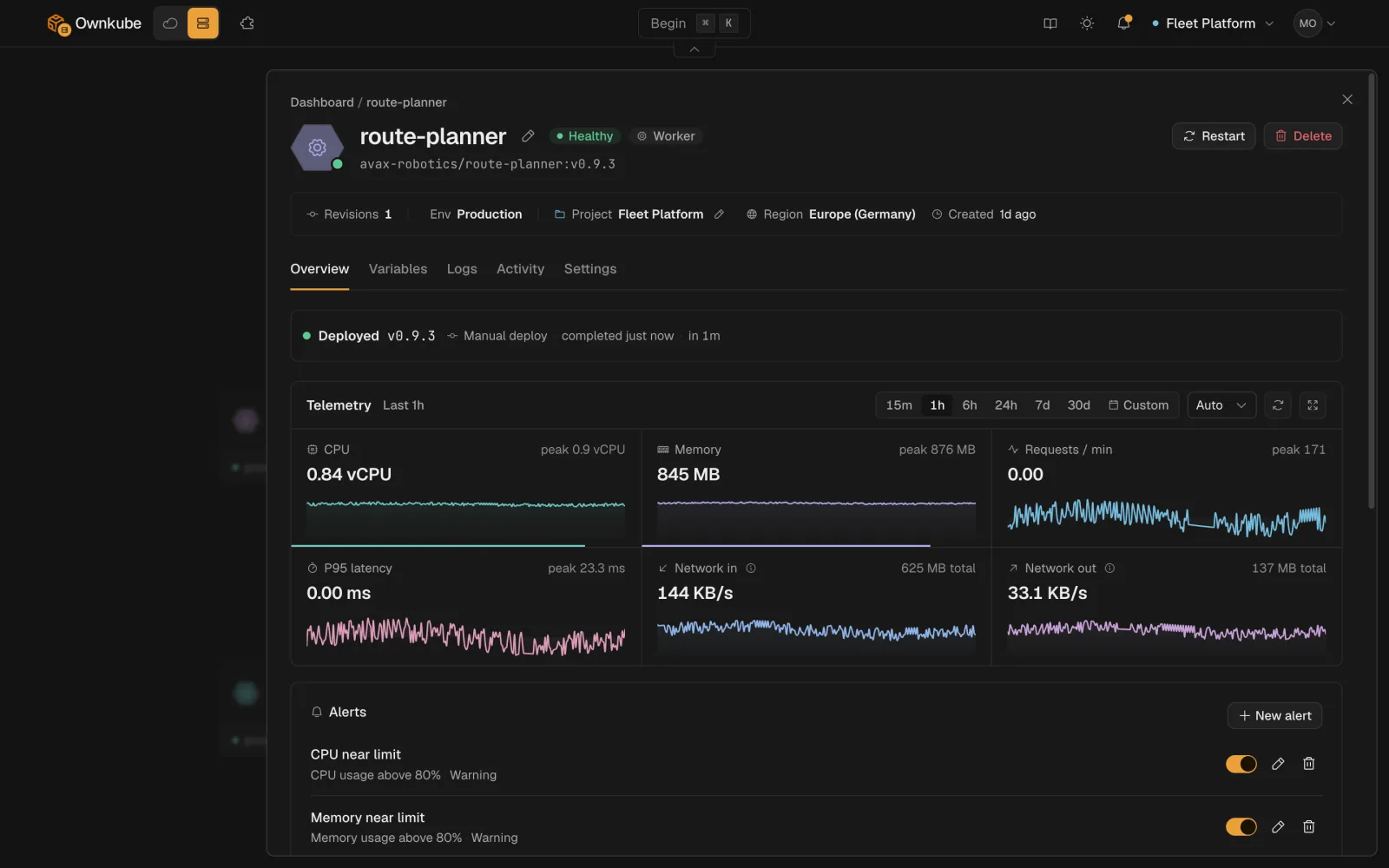 The **Overview** tab shows live status, the public hostname, the current image or commit, replica count, CPU and memory charts, the Alerts card, and the app platform version with an **Upgrade** control when a newer version is available.
## How a rollout works
Every saved change rolls out gradually. New containers start, pass their [health checks](/docs/deployments/health-checks), and only then take traffic while the old ones stop. There is no separate deploy button. A rollout that cannot become healthy leaves the previous revision serving, and the **Activity** tab shows what changed with a one-click [rollback](/docs/deployments/rollbacks).
Status during a rollout moves through **Syncing** to **Healthy**, or to **Degraded** if a container keeps failing. See [Observability](/docs/observability) for every status.
## App platform version
Web apps, workers and jobs run on the **app platform version**, the runtime Ownkube ships underneath your container. When a newer version is published, the **Overview** tab shows an **Upgrade** control. Upgrades are forward-only and designed not to affect a running deployment. See [platform version](/docs/glossary/platform-version).
## Deleting a deployment
**Delete** lives at the bottom of the **Settings** tab and asks you to type the deployment's name. Deleting stops the workload, releases its hostname, and for a database or cache removes the data. Owners and admins can delete; see [Organizations and roles](/docs/organizations).
## Limits
- A deployment's name must be unique within its environment.
- Fixed replicas go up to 20; autoscaling up to 100.
- Public hostnames are allocated to web apps. Workers and jobs stay private.
- Pin image tags. `latest` works, but every deploy is then harder to trace to a build.
- [Create a deployment](/docs/deployments/create)
- [Configuration reference](/docs/deployments/configuration)
- [Scheduled jobs](/docs/deployments/jobs)
---
**Don't see a feature you need?** Email [support@ownkube.io](mailto:support@ownkube.io?subject=Feature%20request). Ownkube is shaped by the teams using it and we ship what our users ask for.
## Search
This site has a search endpoint: https://context7.com/api/v2/ask?siteKey=ask_c64dfe8ffaa8d3ad19576838&query=. It returns documentation that answers the question, with a source link for each part. No API key is needed. If nothing matches, it says so.
The **Overview** tab shows live status, the public hostname, the current image or commit, replica count, CPU and memory charts, the Alerts card, and the app platform version with an **Upgrade** control when a newer version is available.
## How a rollout works
Every saved change rolls out gradually. New containers start, pass their [health checks](/docs/deployments/health-checks), and only then take traffic while the old ones stop. There is no separate deploy button. A rollout that cannot become healthy leaves the previous revision serving, and the **Activity** tab shows what changed with a one-click [rollback](/docs/deployments/rollbacks).
Status during a rollout moves through **Syncing** to **Healthy**, or to **Degraded** if a container keeps failing. See [Observability](/docs/observability) for every status.
## App platform version
Web apps, workers and jobs run on the **app platform version**, the runtime Ownkube ships underneath your container. When a newer version is published, the **Overview** tab shows an **Upgrade** control. Upgrades are forward-only and designed not to affect a running deployment. See [platform version](/docs/glossary/platform-version).
## Deleting a deployment
**Delete** lives at the bottom of the **Settings** tab and asks you to type the deployment's name. Deleting stops the workload, releases its hostname, and for a database or cache removes the data. Owners and admins can delete; see [Organizations and roles](/docs/organizations).
## Limits
- A deployment's name must be unique within its environment.
- Fixed replicas go up to 20; autoscaling up to 100.
- Public hostnames are allocated to web apps. Workers and jobs stay private.
- Pin image tags. `latest` works, but every deploy is then harder to trace to a build.
- [Create a deployment](/docs/deployments/create)
- [Configuration reference](/docs/deployments/configuration)
- [Scheduled jobs](/docs/deployments/jobs)
---
**Don't see a feature you need?** Email [support@ownkube.io](mailto:support@ownkube.io?subject=Feature%20request). Ownkube is shaped by the teams using it and we ship what our users ask for.
## Search
This site has a search endpoint: https://context7.com/api/v2/ask?siteKey=ask_c64dfe8ffaa8d3ad19576838&query=. It returns documentation that answers the question, with a source link for each part. No API key is needed. If nothing matches, it says so.