# Builds and source
> How Ownkube turns a GitHub or GitLab repository into a running image: the GitHub App, GitLab connection, Dockerfile or automatic builds, builder sizes, build arguments, root directory, and build minutes.
A web app, worker or job runs a container image. Ownkube can build that image from a GitHub or GitLab repository on every push, or run an image you already publish. This page covers both and the build settings on the **Builder** tab.
## Connect GitHub or GitLab
Connections live under **Version control** in [Settings](https://app.ownkube.io/dashboard/settings). Only organization owners and admins can connect a provider. Ownkube builds from GitHub through a GitHub App, so you grant access to exactly the repositories you choose and no personal token is stored. GitLab connects with OAuth against your GitLab account.
1. **Open Settings**
Go to [**Settings**](https://app.ownkube.io/dashboard/settings) and open the **Version control** section.
2. **Install the Ownkube GitHub App**
Click **Connect GitHub**, pick the account or organization, and choose **All repositories** or a list of specific ones. GitHub returns you to Ownkube with the connection active.
3. **Deploy**
Connected repositories appear in the repository picker when you [create a deployment](/docs/deployments/create).
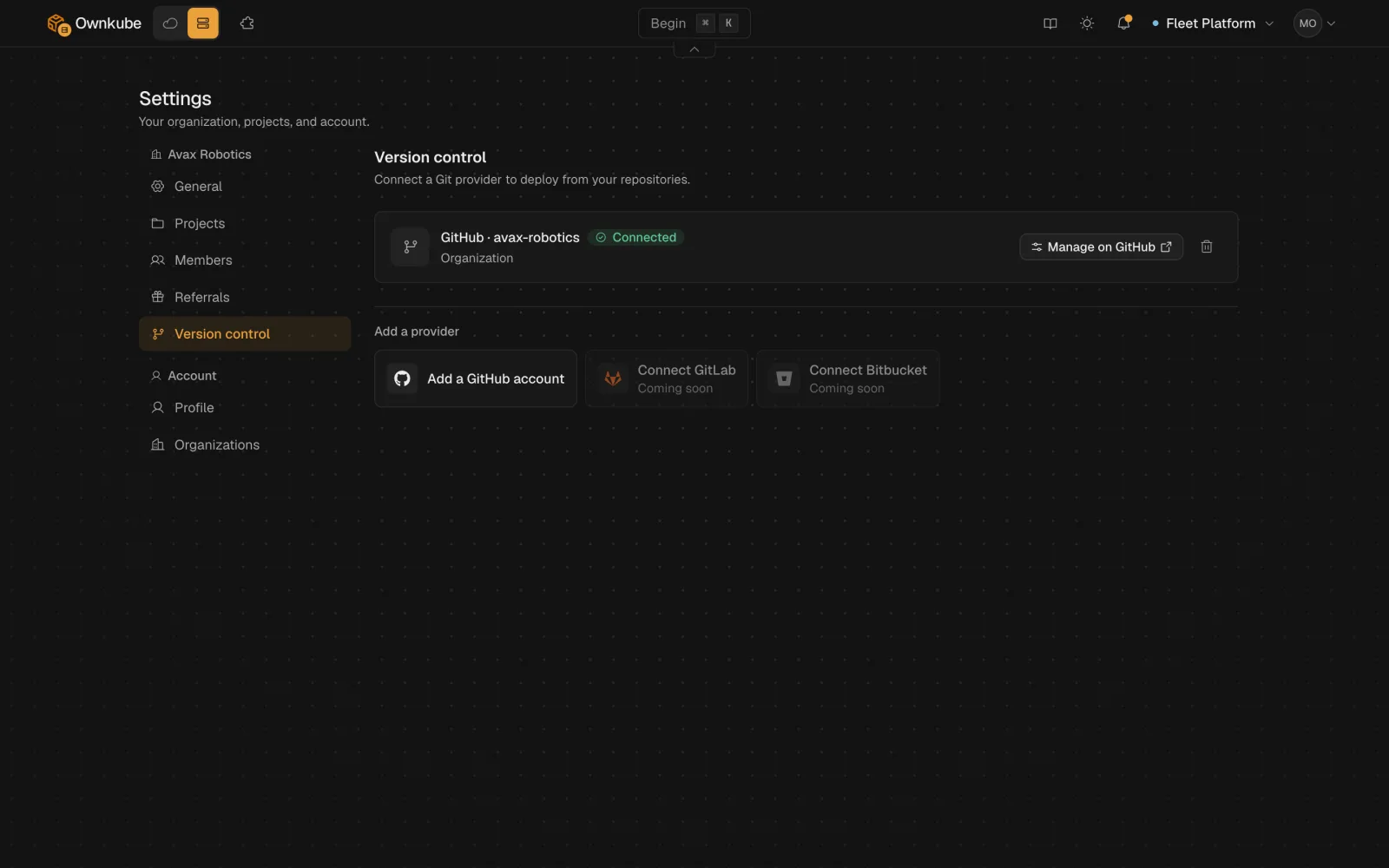 To change which GitHub repositories are shared, use **Configure** next to the connection; it opens the installation page on GitHub. The GitHub App can be installed on more than one account or organization, and each deployment remembers which connection it builds from.
### GitLab
Click **Connect GitLab** on the same tab. GitLab asks you to authorize Ownkube and returns you to Settings with the connection active; repositories you can access then appear in the picker. Pushes to a deployment's branch build the same way as GitHub pushes.
Removing a connection stops future builds but leaves running deployments as they are. Bitbucket is not supported yet; deploy from an image instead.
## Dockerfile or automatic build
#### Dockerfile
If the repository (or the root directory you set) on either provider contains a [`Dockerfile`](https://docs.docker.com/reference/dockerfile/), Ownkube builds with it. You control the base image, the build steps and the start command. This is the right choice for anything with system dependencies or a custom runtime.
#### Automatic build
Without a Dockerfile, the automatic build detects the language and framework from the repository (`package.json`, `requirements.txt`, `go.mod`, `Gemfile`, `composer.json`, `pom.xml` and so on), installs dependencies, runs the build step and produces an image. The [framework guides](/docs/deploy) note what each detector expects.
Either way, the result is an image stored by Ownkube and rolled out as a new revision. Every push to the deployment's branch triggers a build; to rebuild the same commit, use **Rebuild** on the **Builder** tab or `okctl deploy rebuild`.
## The Builder tab
| Setting | What it does |
|---|---|
| **Root directory** | The folder inside the repository to build from. Set it for monorepos, for example `apps/api`. |
| **Build arguments** | `KEY=value` pairs passed to the build as Docker build arguments. Use variables for anything the running app needs; build arguments are only visible at build time. |
| **Builder size** | **Small** (0.25 vCPU, 1 GB), **Standard** (0.5 vCPU, 2 GB, the default) or **Large** (Team plan). Pick Large for heavy compiles such as Rust or a large Next.js app. |
The same settings are available from the CLI as `okctl deploy build-context`, `okctl deploy build-args` and `okctl deploy builder-size`. See [CLI commands](/docs/cli/commands).
## Build minutes and limits
Builds run on Ownkube's build capacity and are counted in wall-clock minutes, regardless of builder size. Personal includes 300 build minutes a month and Team includes 1,500; Pay as you go bills from the first minute. A single build is capped at 30 minutes (15 on Pay as you go). Rates are on [Plans and pricing](/docs/billing/plans#build-minutes).
## Use an existing image
Choose **Use an existing image** when creating a deployment and enter the image reference and tag, such as `ghcr.io/owner/app:1.2.0` or `docker.io/library/nginx:1.27`. Public images need no connection. Pin a tag rather than `latest` so every revision maps to a known build.
Deploying a new version is a tag change on the **Settings** tab, or `okctl deploy update` from the terminal.
- [Create a deployment](/docs/deployments/create)
- [Deploy a framework](/docs/deploy)
- [Rollbacks and activity](/docs/deployments/rollbacks)
---
**Don't see a feature you need?** Email [support@ownkube.io](mailto:support@ownkube.io?subject=Feature%20request). Ownkube is shaped by the teams using it and we ship what our users ask for.
## Search
This site has a search endpoint: https://context7.com/api/v2/ask?siteKey=ask_c64dfe8ffaa8d3ad19576838&query=. It returns documentation that answers the question, with a source link for each part. No API key is needed. If nothing matches, it says so.
To change which GitHub repositories are shared, use **Configure** next to the connection; it opens the installation page on GitHub. The GitHub App can be installed on more than one account or organization, and each deployment remembers which connection it builds from.
### GitLab
Click **Connect GitLab** on the same tab. GitLab asks you to authorize Ownkube and returns you to Settings with the connection active; repositories you can access then appear in the picker. Pushes to a deployment's branch build the same way as GitHub pushes.
Removing a connection stops future builds but leaves running deployments as they are. Bitbucket is not supported yet; deploy from an image instead.
## Dockerfile or automatic build
#### Dockerfile
If the repository (or the root directory you set) on either provider contains a [`Dockerfile`](https://docs.docker.com/reference/dockerfile/), Ownkube builds with it. You control the base image, the build steps and the start command. This is the right choice for anything with system dependencies or a custom runtime.
#### Automatic build
Without a Dockerfile, the automatic build detects the language and framework from the repository (`package.json`, `requirements.txt`, `go.mod`, `Gemfile`, `composer.json`, `pom.xml` and so on), installs dependencies, runs the build step and produces an image. The [framework guides](/docs/deploy) note what each detector expects.
Either way, the result is an image stored by Ownkube and rolled out as a new revision. Every push to the deployment's branch triggers a build; to rebuild the same commit, use **Rebuild** on the **Builder** tab or `okctl deploy rebuild`.
## The Builder tab
| Setting | What it does |
|---|---|
| **Root directory** | The folder inside the repository to build from. Set it for monorepos, for example `apps/api`. |
| **Build arguments** | `KEY=value` pairs passed to the build as Docker build arguments. Use variables for anything the running app needs; build arguments are only visible at build time. |
| **Builder size** | **Small** (0.25 vCPU, 1 GB), **Standard** (0.5 vCPU, 2 GB, the default) or **Large** (Team plan). Pick Large for heavy compiles such as Rust or a large Next.js app. |
The same settings are available from the CLI as `okctl deploy build-context`, `okctl deploy build-args` and `okctl deploy builder-size`. See [CLI commands](/docs/cli/commands).
## Build minutes and limits
Builds run on Ownkube's build capacity and are counted in wall-clock minutes, regardless of builder size. Personal includes 300 build minutes a month and Team includes 1,500; Pay as you go bills from the first minute. A single build is capped at 30 minutes (15 on Pay as you go). Rates are on [Plans and pricing](/docs/billing/plans#build-minutes).
## Use an existing image
Choose **Use an existing image** when creating a deployment and enter the image reference and tag, such as `ghcr.io/owner/app:1.2.0` or `docker.io/library/nginx:1.27`. Public images need no connection. Pin a tag rather than `latest` so every revision maps to a known build.
Deploying a new version is a tag change on the **Settings** tab, or `okctl deploy update` from the terminal.
- [Create a deployment](/docs/deployments/create)
- [Deploy a framework](/docs/deploy)
- [Rollbacks and activity](/docs/deployments/rollbacks)
---
**Don't see a feature you need?** Email [support@ownkube.io](mailto:support@ownkube.io?subject=Feature%20request). Ownkube is shaped by the teams using it and we ship what our users ask for.
## Search
This site has a search endpoint: https://context7.com/api/v2/ask?siteKey=ask_c64dfe8ffaa8d3ad19576838&query=. It returns documentation that answers the question, with a source link for each part. No API key is needed. If nothing matches, it says so.