# Create a deployment
> The create-deployment flow on Ownkube, field by field: resource type, source, port, variables, resources, region, and what to check once it's live.
This is the long version of the [Quickstart](/docs/quickstart): every field in the create flow, what it does, and what to check once the app is live. The same flow creates every [resource type](/docs/deployments).
## Before you start
- For a source build, connect the Ownkube GitHub App or your GitLab account under **Version control** in [Settings](https://app.ownkube.io/dashboard/settings) so your repositories appear in the picker. See [Builds and source](/docs/deployments/builds).
- For an image deployment, have the image reference and tag ready, such as `ghcr.io/owner/app:1.2.0`.
- Know the port your app listens on. Most frameworks read it from a `PORT` variable; the [framework guides](/docs/deploy) list the right value.
## The create flow
1. **Open the flow**
From the [dashboard](https://app.ownkube.io/dashboard) click **New**, or press ⌘ K and choose **Deployment**.
2. **Pick the resource type**
**Web app**, **Worker**, **Job**, **Database** or **Cache**. The rest of the form changes to match. Databases and caches skip source, port and variables; see [Postgres](/docs/data/postgres) and [Valkey cache](/docs/data/valkey).
3. **Name it and place it**
Choose a **name** (lowercase letters, numbers and dashes, unique within the environment), a [**project**](/docs/organizations/projects), an [**environment**](/docs/deployments/environments) and a [**region**](/docs/deployments/regions). The region is fixed once created.
4. **Choose the source**
#### Build from a repository
Pick the **repository** and **branch** from your connected GitHub or GitLab account. Ownkube detects a Dockerfile in the repository and uses it; without one, the automatic build detects the language. Set a **root directory** if your app lives in a subfolder of a monorepo. Every later push to the branch builds and deploys.
#### Use an existing image
Enter the **image** and **tag**. Public images need no connection. Pin a tag such as `1.2.0` or a short commit SHA rather than `latest`.
5. **Set the port**
The port your container listens on, for example `3000` or `8080`. Ownkube routes the public hostname and private traffic to it.
6. **Add variables**
Add `KEY=value` pairs. Flip **Secret** on anything sensitive; secrets are masked in the UI and never appear in logs or the activity diff. Values the environment shares with every deployment are inherited automatically. See [Variables](/docs/deployments/variables).
7. **Size it**
Leave the defaults for a first deploy. Metered CPU and memory bill for what the app uses; a reserved box bills a flat rate. [Autoscaling](/docs/deployments/autoscaling), [health checks](/docs/deployments/health-checks) and [sleep](/docs/deployments/sleep) can wait until the app runs.
8. **Create**
Click **Create deployment**. The page switches to the deployment's **Overview** and shows the build and rollout as they happen.
## Watch it come up
For a source build, the **Builder** tab shows the pipeline: **Queued**, **Build**, **Image**, **Deploy**, **Live**, with the build log streaming under it.
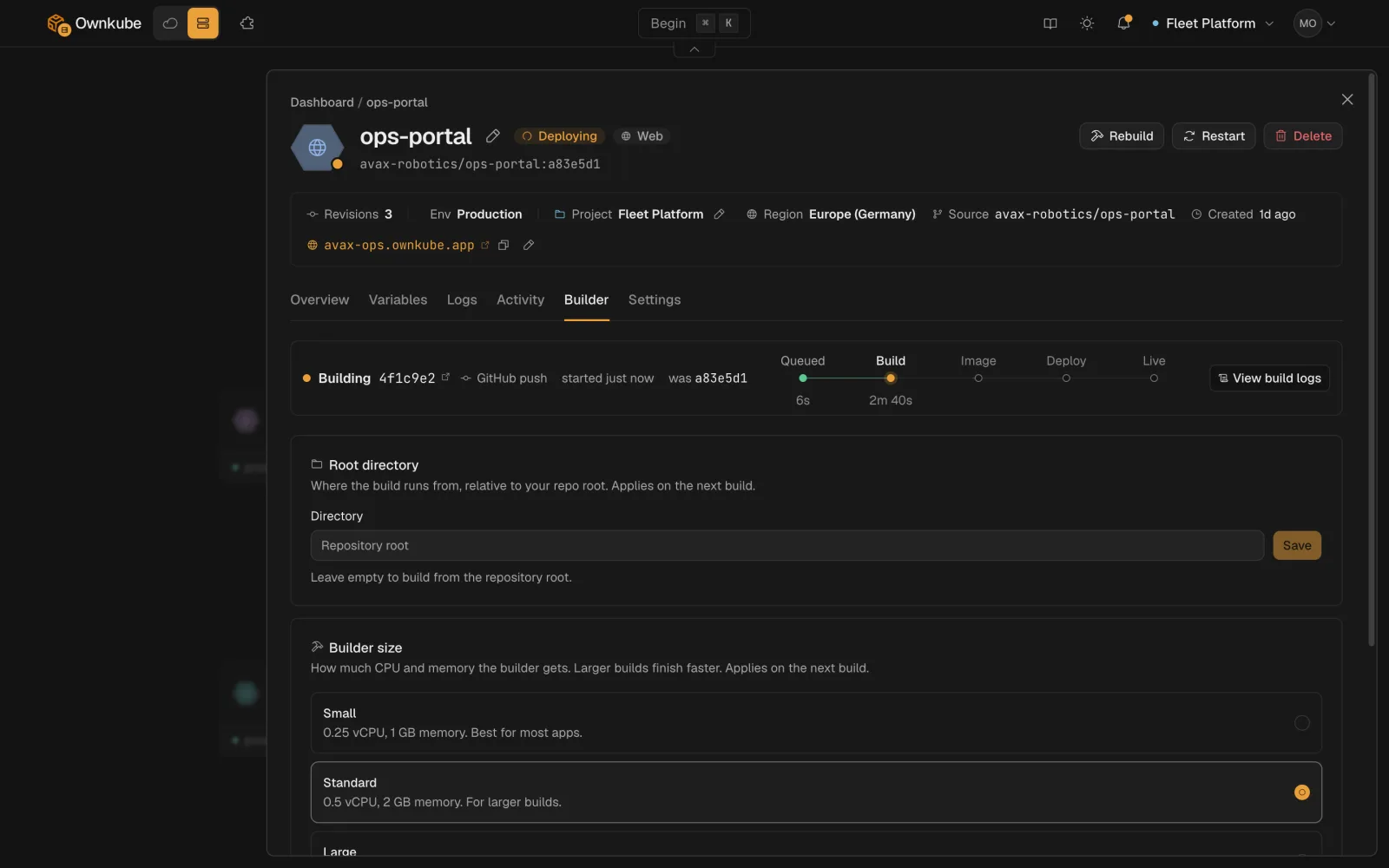 Status on **Overview** moves from **Syncing** to **Healthy** when the container passes its health checks. Open the hostname. If it stays **Degraded**, the **Logs** tab usually shows why: a crash on start, the wrong port, or a missing variable. See [Observability](/docs/observability) for every status and what to do.
## Common first-deploy mistakes
| Symptom | Likely cause | Fix |
|---|---|---|
| Degraded, logs show the app started | Port mismatch | Set **Port** to the port the app actually binds, and bind on `0.0.0.0`, not `localhost`. |
| Degraded, app exits immediately | Missing variable | Compare the **Logs** tab against your `.env`; add the variable and save. |
| Build fails at install | Wrong root directory or lockfile | Set **Root directory** on the **Builder** tab; commit the lockfile. |
| Build succeeds, 502 on the hostname | App listens on the wrong interface | Bind on `0.0.0.0` and the configured port. |
## Deploying the next change
Push to the branch and Ownkube builds and rolls out. For an image deployment, change the **tag** on **Settings** and save. Every change is a revision on the **Activity** tab, with a diff and a one-click [rollback](/docs/deployments/rollbacks).
- [Deploy a framework](/docs/deploy)
- [Postgres](/docs/data/postgres)
- [Configuration reference](/docs/deployments/configuration)
---
**Don't see a feature you need?** Email [support@ownkube.io](mailto:support@ownkube.io?subject=Feature%20request). Ownkube is shaped by the teams using it and we ship what our users ask for.
## Search
This site has a search endpoint: https://context7.com/api/v2/ask?siteKey=ask_c64dfe8ffaa8d3ad19576838&query=. It returns documentation that answers the question, with a source link for each part. No API key is needed. If nothing matches, it says so.
Status on **Overview** moves from **Syncing** to **Healthy** when the container passes its health checks. Open the hostname. If it stays **Degraded**, the **Logs** tab usually shows why: a crash on start, the wrong port, or a missing variable. See [Observability](/docs/observability) for every status and what to do.
## Common first-deploy mistakes
| Symptom | Likely cause | Fix |
|---|---|---|
| Degraded, logs show the app started | Port mismatch | Set **Port** to the port the app actually binds, and bind on `0.0.0.0`, not `localhost`. |
| Degraded, app exits immediately | Missing variable | Compare the **Logs** tab against your `.env`; add the variable and save. |
| Build fails at install | Wrong root directory or lockfile | Set **Root directory** on the **Builder** tab; commit the lockfile. |
| Build succeeds, 502 on the hostname | App listens on the wrong interface | Bind on `0.0.0.0` and the configured port. |
## Deploying the next change
Push to the branch and Ownkube builds and rolls out. For an image deployment, change the **tag** on **Settings** and save. Every change is a revision on the **Activity** tab, with a diff and a one-click [rollback](/docs/deployments/rollbacks).
- [Deploy a framework](/docs/deploy)
- [Postgres](/docs/data/postgres)
- [Configuration reference](/docs/deployments/configuration)
---
**Don't see a feature you need?** Email [support@ownkube.io](mailto:support@ownkube.io?subject=Feature%20request). Ownkube is shaped by the teams using it and we ship what our users ask for.
## Search
This site has a search endpoint: https://context7.com/api/v2/ask?siteKey=ask_c64dfe8ffaa8d3ad19576838&query=. It returns documentation that answers the question, with a source link for each part. No API key is needed. If nothing matches, it says so.