# Health checks
> Startup, liveness and readiness probes on Ownkube: what each one does, sensible defaults for a web app, and how they gate rollouts and traffic.
Health checks tell Ownkube when a container is ready for traffic and when it needs a restart. They are what makes a rollout zero-downtime: new containers must pass before old ones stop, and a container that stops passing is taken out of rotation.
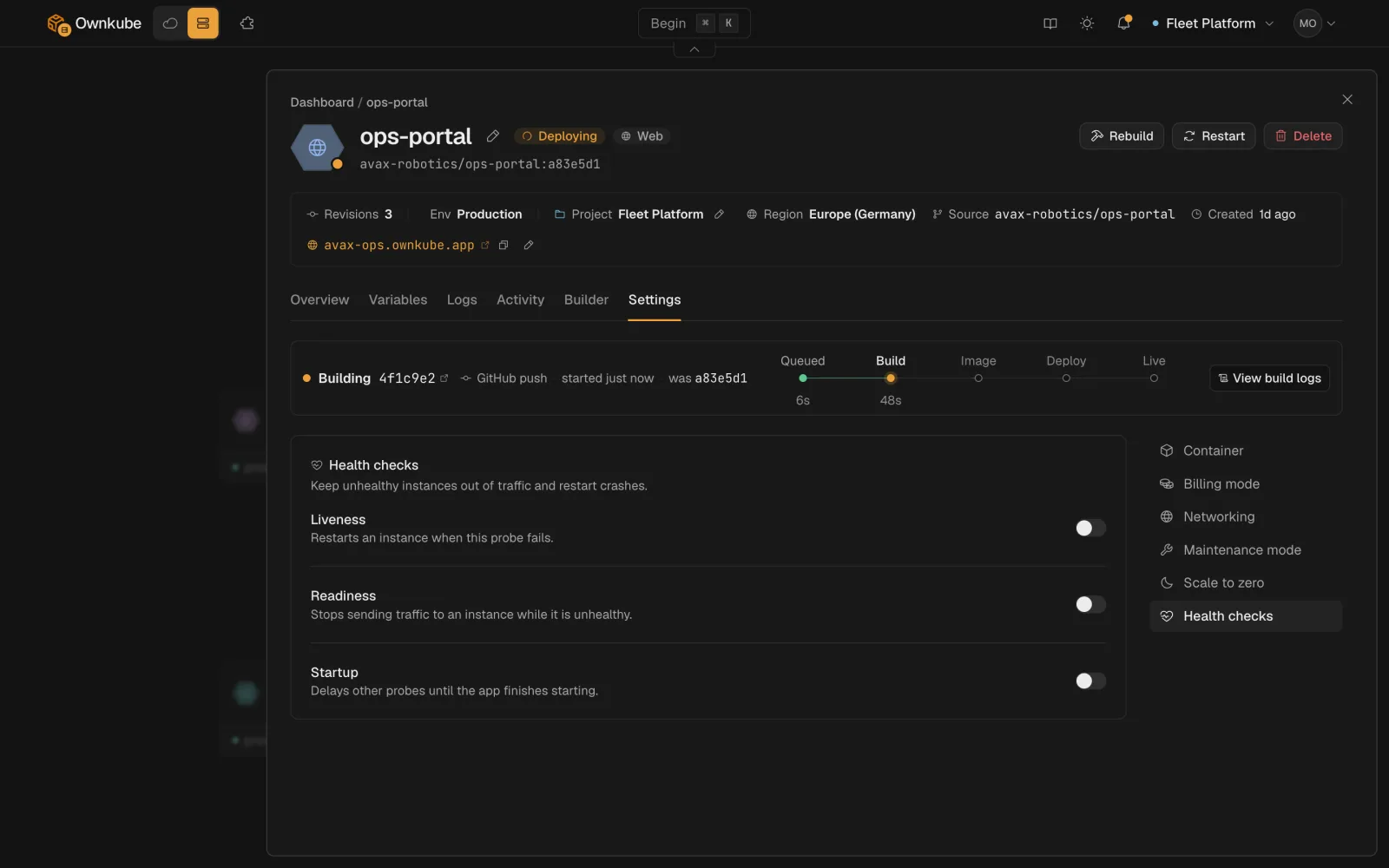 ## The three probes
| Probe | Question it answers | On failure |
|---|---|---|
| **Startup** | Has the container finished booting? | Keeps waiting up to the failure threshold, then restarts the container. Liveness and readiness do not run until startup passes. |
| **Readiness** | Can this container take traffic right now? | Removes the container from the hostname and private address until it passes again. No restart. |
| **Liveness** | Is this container still alive? | Restarts the container. |
Each probe sends an HTTP `GET` to a **path** on the container's port and treats any `2xx` or `3xx` as a pass. The same ideas are documented in detail in the [Kubernetes probe reference](https://kubernetes.io/docs/tasks/configure-pod-container/configure-liveness-readiness-startup-probes/), which Ownkube follows.
## Defaults and ranges
| Field | Default | Range |
|---|---|---|
| Path | `/health` | any path |
| Period | 10 s | 1 to 300 |
| Timeout | 5 s | 1 to 60 |
| Failure threshold | 3 | 1 to 30 |
| Initial delay | 0 s | 0 to 300 |
All three are off by default. Without probes, Ownkube treats a container as ready as soon as its process is running, which is fine for a first deploy and wrong for anything that takes a few seconds to warm up.
## A sensible setup for a web app
1. **Add a health route**
Return `200` from `/health` (or `/healthz`, `/ready`) once the app can serve requests, including after its database connection is up. Most [framework guides](/docs/deploy) show the one-liner.
2. **Turn on readiness**
On the **Settings** tab, enable **Readiness** with path `/health`, period `10`, failure threshold `3`. This alone gives you zero-downtime rollouts.
3. **Turn on liveness if the app can hang**
For apps that can deadlock or leak until they stop answering, enable **Liveness** on the same path with a longer period, such as `30`, so a slow request does not trigger a restart.
4. **Add a startup probe for slow boots**
If the app needs longer than a few seconds to start (JVM, large Rails app, migrations on boot), enable **Startup** with a failure threshold big enough to cover the boot: period `5` and threshold `30` allows 150 seconds.
## What you see
A container failing its probes shows the deployment as **Degraded** on the **Overview** tab, with the probe result in the status detail. During a rollout, the status stays **Syncing** until the new containers pass readiness. See [Observability](/docs/observability) for every status. A **restarts** [alert](/docs/observability/alerts) catches a liveness restart loop before users do.
## Workers and jobs
Workers have no hostname, so readiness only affects private traffic. A liveness probe still makes sense if the worker exposes a small HTTP status endpoint. Jobs do not use probes; a job is healthy when its process exits with status `0`.
- [Rollbacks and activity](/docs/deployments/rollbacks)
- [Configuration reference](/docs/deployments/configuration#health-checks)
- [Alerts](/docs/observability/alerts)
---
**Don't see a feature you need?** Email [support@ownkube.io](mailto:support@ownkube.io?subject=Feature%20request). Ownkube is shaped by the teams using it and we ship what our users ask for.
## Search
This site has a search endpoint: https://context7.com/api/v2/ask?siteKey=ask_c64dfe8ffaa8d3ad19576838&query=. It returns documentation that answers the question, with a source link for each part. No API key is needed. If nothing matches, it says so.
## The three probes
| Probe | Question it answers | On failure |
|---|---|---|
| **Startup** | Has the container finished booting? | Keeps waiting up to the failure threshold, then restarts the container. Liveness and readiness do not run until startup passes. |
| **Readiness** | Can this container take traffic right now? | Removes the container from the hostname and private address until it passes again. No restart. |
| **Liveness** | Is this container still alive? | Restarts the container. |
Each probe sends an HTTP `GET` to a **path** on the container's port and treats any `2xx` or `3xx` as a pass. The same ideas are documented in detail in the [Kubernetes probe reference](https://kubernetes.io/docs/tasks/configure-pod-container/configure-liveness-readiness-startup-probes/), which Ownkube follows.
## Defaults and ranges
| Field | Default | Range |
|---|---|---|
| Path | `/health` | any path |
| Period | 10 s | 1 to 300 |
| Timeout | 5 s | 1 to 60 |
| Failure threshold | 3 | 1 to 30 |
| Initial delay | 0 s | 0 to 300 |
All three are off by default. Without probes, Ownkube treats a container as ready as soon as its process is running, which is fine for a first deploy and wrong for anything that takes a few seconds to warm up.
## A sensible setup for a web app
1. **Add a health route**
Return `200` from `/health` (or `/healthz`, `/ready`) once the app can serve requests, including after its database connection is up. Most [framework guides](/docs/deploy) show the one-liner.
2. **Turn on readiness**
On the **Settings** tab, enable **Readiness** with path `/health`, period `10`, failure threshold `3`. This alone gives you zero-downtime rollouts.
3. **Turn on liveness if the app can hang**
For apps that can deadlock or leak until they stop answering, enable **Liveness** on the same path with a longer period, such as `30`, so a slow request does not trigger a restart.
4. **Add a startup probe for slow boots**
If the app needs longer than a few seconds to start (JVM, large Rails app, migrations on boot), enable **Startup** with a failure threshold big enough to cover the boot: period `5` and threshold `30` allows 150 seconds.
## What you see
A container failing its probes shows the deployment as **Degraded** on the **Overview** tab, with the probe result in the status detail. During a rollout, the status stays **Syncing** until the new containers pass readiness. See [Observability](/docs/observability) for every status. A **restarts** [alert](/docs/observability/alerts) catches a liveness restart loop before users do.
## Workers and jobs
Workers have no hostname, so readiness only affects private traffic. A liveness probe still makes sense if the worker exposes a small HTTP status endpoint. Jobs do not use probes; a job is healthy when its process exits with status `0`.
- [Rollbacks and activity](/docs/deployments/rollbacks)
- [Configuration reference](/docs/deployments/configuration#health-checks)
- [Alerts](/docs/observability/alerts)
---
**Don't see a feature you need?** Email [support@ownkube.io](mailto:support@ownkube.io?subject=Feature%20request). Ownkube is shaped by the teams using it and we ship what our users ask for.
## Search
This site has a search endpoint: https://context7.com/api/v2/ask?siteKey=ask_c64dfe8ffaa8d3ad19576838&query=. It returns documentation that answers the question, with a source link for each part. No API key is needed. If nothing matches, it says so.