# Rollbacks and activity
> Every change to an Ownkube deployment is a revision with a diff on the Activity tab. Roll back in one click, promote a revision to another environment, restart or resync.
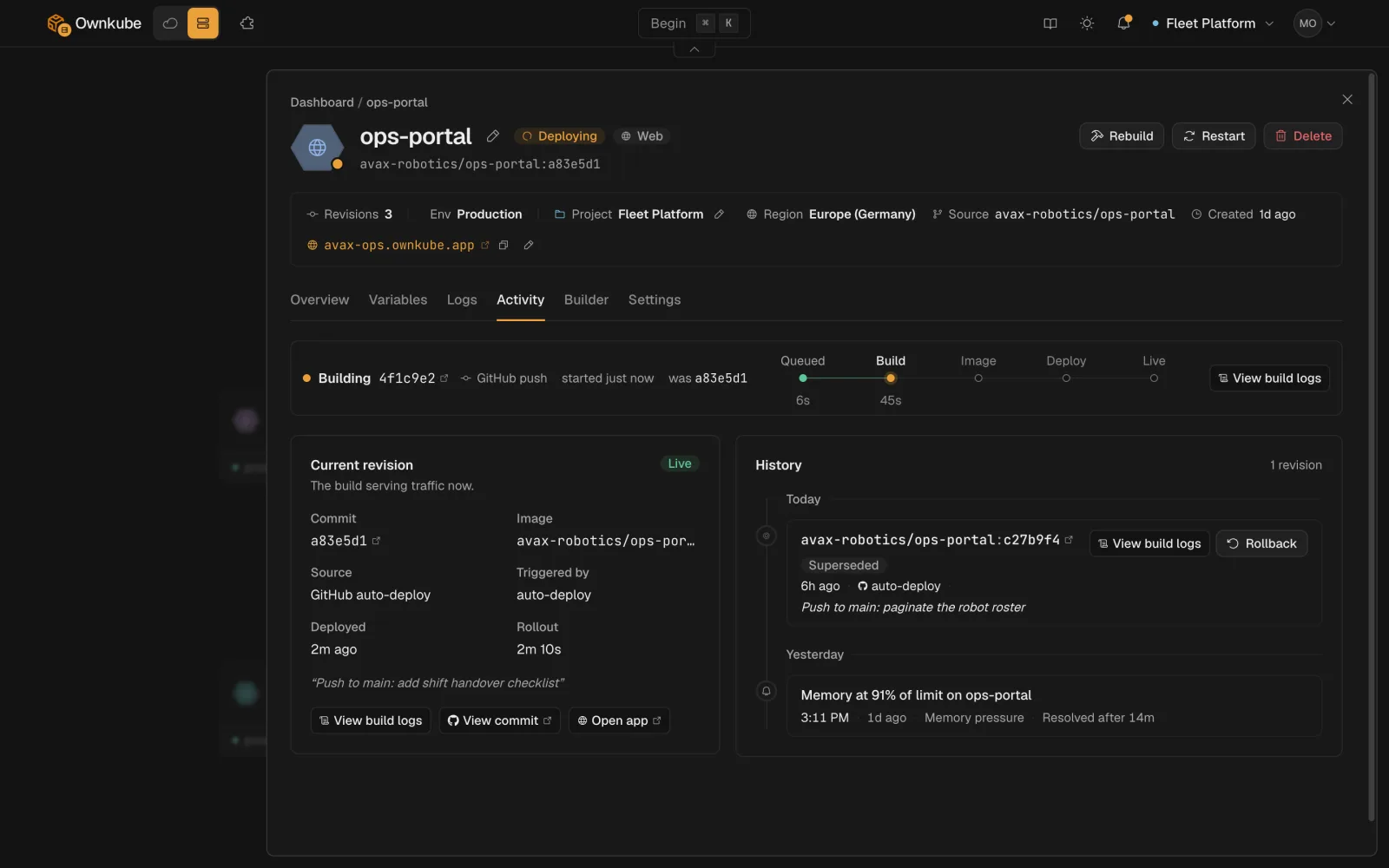
Every change to a deployment, whether a push, a variable edit, a scaling change or a tag bump, is a **revision**. The **Activity** tab lists them with who made the change, when, and a field-level diff, and any earlier revision is one click from being live again.
 ## Roll back
1. **Open Activity**
On the deployment's page, open **Activity**. The live revision is marked.
2. **Pick a revision**
Expand any earlier revision to see exactly what differed: image or commit, port, variables (secret values stay masked), resources, probes.
3. **Roll back**
Click **Roll back**. Ownkube creates a new revision with the old configuration and rolls it out through the usual [health checks](/docs/deployments/health-checks). A rollback is itself a revision, so it shows in the history and can be undone the same way.
From the terminal: `okctl deploy revisions ` to list, `okctl deploy rollback ` to roll back. Your coding agent can do the same through the [MCP server](/docs/mcp).
How far back you can go depends on the plan: the last 3 revisions on Pay as you go, 10 on Personal and Team. See [Plans and pricing](/docs/billing/plans).
## When a rollout fails
A rollout that cannot become healthy does not take traffic. The previous revision keeps serving, the status shows **Degraded** or stays **Syncing**, and the **Logs** tab shows what the new containers did. Fix forward with another change, or roll back to the last healthy revision. See [Observability](/docs/observability).
## Other actions on a deployment
| Action | What it does | CLI |
|---|---|---|
| **Promote** | Copy the live revision onto a deployment in another environment, without its variables. See [Environments](/docs/deployments/environments#promote-between-environments). | `okctl deploy promote` |
| **Copy** | Clone the deployment into another environment or cluster. | `okctl deploy copy` |
| **Restart** | Roll every container without changing configuration. | `okctl deploy restart` |
| **Rebuild** | Build the current commit again and roll out the result. | `okctl deploy rebuild` |
| **Resync** | Re-apply the current configuration to recover a stalled rollout. | `okctl deploy resync` |
| **Maintenance page** | Serve a maintenance page on the hostname while you work. | `okctl deploy maintenance` |
## Who can do what
Members can roll back, restart and promote. Deleting a deployment and revealing credentials need an owner or admin. Every action is recorded on Activity with the user who ran it. See [Organizations and roles](/docs/organizations).
- [Environments](/docs/deployments/environments)
- [Observability](/docs/observability)
- [CLI commands](/docs/cli/commands)
---
**Don't see a feature you need?** Email [support@ownkube.io](mailto:support@ownkube.io?subject=Feature%20request). Ownkube is shaped by the teams using it and we ship what our users ask for.
## Search
This site has a search endpoint: https://context7.com/api/v2/ask?siteKey=ask_c64dfe8ffaa8d3ad19576838&query=. It returns documentation that answers the question, with a source link for each part. No API key is needed. If nothing matches, it says so.
## Roll back
1. **Open Activity**
On the deployment's page, open **Activity**. The live revision is marked.
2. **Pick a revision**
Expand any earlier revision to see exactly what differed: image or commit, port, variables (secret values stay masked), resources, probes.
3. **Roll back**
Click **Roll back**. Ownkube creates a new revision with the old configuration and rolls it out through the usual [health checks](/docs/deployments/health-checks). A rollback is itself a revision, so it shows in the history and can be undone the same way.
From the terminal: `okctl deploy revisions ` to list, `okctl deploy rollback ` to roll back. Your coding agent can do the same through the [MCP server](/docs/mcp).
How far back you can go depends on the plan: the last 3 revisions on Pay as you go, 10 on Personal and Team. See [Plans and pricing](/docs/billing/plans).
## When a rollout fails
A rollout that cannot become healthy does not take traffic. The previous revision keeps serving, the status shows **Degraded** or stays **Syncing**, and the **Logs** tab shows what the new containers did. Fix forward with another change, or roll back to the last healthy revision. See [Observability](/docs/observability).
## Other actions on a deployment
| Action | What it does | CLI |
|---|---|---|
| **Promote** | Copy the live revision onto a deployment in another environment, without its variables. See [Environments](/docs/deployments/environments#promote-between-environments). | `okctl deploy promote` |
| **Copy** | Clone the deployment into another environment or cluster. | `okctl deploy copy` |
| **Restart** | Roll every container without changing configuration. | `okctl deploy restart` |
| **Rebuild** | Build the current commit again and roll out the result. | `okctl deploy rebuild` |
| **Resync** | Re-apply the current configuration to recover a stalled rollout. | `okctl deploy resync` |
| **Maintenance page** | Serve a maintenance page on the hostname while you work. | `okctl deploy maintenance` |
## Who can do what
Members can roll back, restart and promote. Deleting a deployment and revealing credentials need an owner or admin. Every action is recorded on Activity with the user who ran it. See [Organizations and roles](/docs/organizations).
- [Environments](/docs/deployments/environments)
- [Observability](/docs/observability)
- [CLI commands](/docs/cli/commands)
---
**Don't see a feature you need?** Email [support@ownkube.io](mailto:support@ownkube.io?subject=Feature%20request). Ownkube is shaped by the teams using it and we ship what our users ask for.
## Search
This site has a search endpoint: https://context7.com/api/v2/ask?siteKey=ask_c64dfe8ffaa8d3ad19576838&query=. It returns documentation that answers the question, with a source link for each part. No API key is needed. If nothing matches, it says so.