# How it works
> Control plane in our cloud, data plane in yours. Vanilla infrastructure you can walk away from.
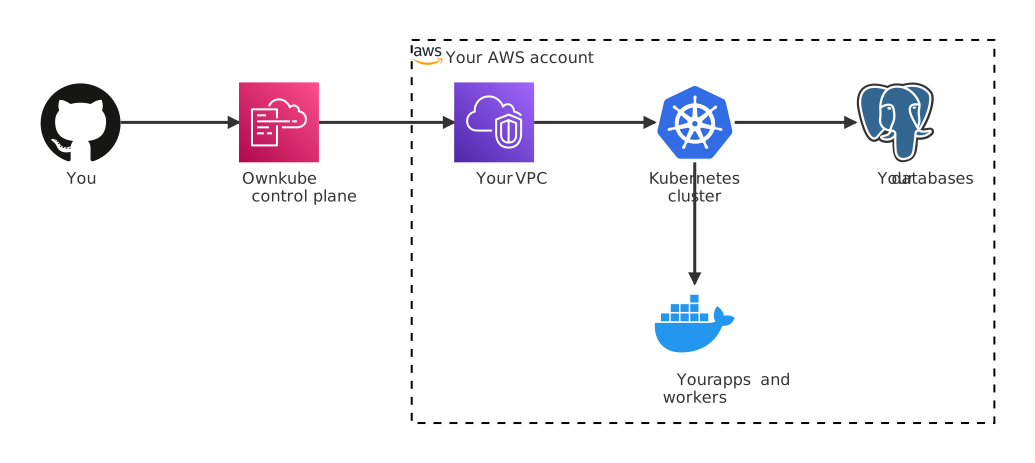
Ownkube is a **control plane** that provisions and manages [Kubernetes](https://kubernetes.io/) infrastructure inside your own AWS account. Your code, containers, databases, and traffic never leave your VPC.
## Architecture
The control plane only ever receives **configuration intent**: "deploy this image, with these env vars, at this scale". The actual rollout happens through a role Ownkube assumes in your AWS account. Application data, logs, and runtime state stay inside your VPC.
## What runs where
| Component | Where it runs | Who owns it |
|---|---|---|
| Your applications | Your AWS account, inside your VPC | You |
| Your databases | Your AWS account, inside your VPC | You |
| Functions (beta) | Your AWS account, tied to an account + region, not a cluster | You |
| Container images | Your registry (Amazon ECR, GitHub-built, or a public image) | You |
| Secrets + env vars | Your cluster's Kubernetes secret store | You, encrypted at rest |
| Cluster configuration | Ownkube control plane | Ownkube (intent only, no app data) |
| User accounts + billing | Ownkube control plane | Ownkube |
## The three stages
1. **Connect your cloud**
Connect your AWS account in the [AWS onboarding flow](https://app.ownkube.io/dashboard/aws-onboarding). A CloudFormation stack creates a least-privilege IAM role in your account that Ownkube assumes via a unique external ID. No root credentials, no access keys.
See [Connect your AWS account](/docs/guides/connect-aws) for the full walkthrough.
2. **Provision infrastructure**
Create a cluster from your [dashboard](https://app.ownkube.io/dashboard). Ownkube provisions standard AWS resources inside your VPC: VPC, subnets, [EKS](https://aws.amazon.com/eks/) control plane (Production), or EC2 + [K3s](https://github.com/k3s-io/k3s) on one AWS instance (Starter), IAM, load balancers.
See [Clusters](/docs/features/clusters) for the EKS vs K3s split.
3. **Deploy your workloads**
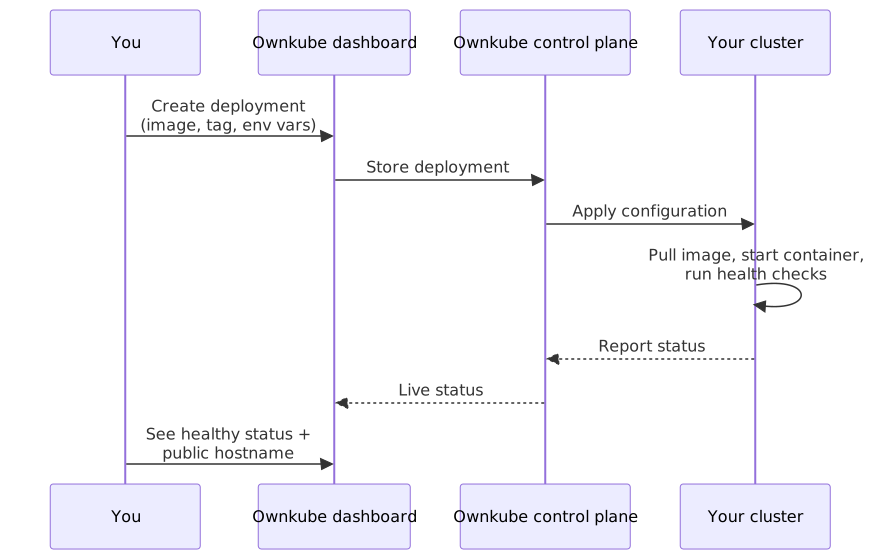
Push an image to a connected registry, pick a tag in the create-deployment flow from your [dashboard](https://app.ownkube.io/dashboard), and Ownkube rolls it out. Rolling updates, health checks, and zero-downtime rollouts are handled for you.
See [Deployments](/docs/features/deployments).
## Two cluster shapes
- [Starter (K3s)](/docs/features/clusters#starter-k3s)
- [Production (managed EKS)](/docs/features/clusters#production-eks)
You can run both in the same organization. Dev workloads on a free Starter cluster (you only pay AWS for the small EC2 instance), production on EKS.
## The deployment flow
Every config change (new image tag, env var update, autoscaling change) triggers a rolling update. New containers start and pass health checks before old containers receive traffic or terminate.
## Security model
Least-privilege IAM
The CloudFormation stack creates a single IAM role scoped to operations Ownkube actually performs: EKS, EC2, VPC, IAM role-passing, CloudFormation, S3, and a handful of read-only describe actions. No admin access, no access keys.
No data egress
Ownkube never receives application data, logs, request bodies, or database rows. The control plane only handles configuration and status. Every runtime byte stays in your VPC.
Encryption everywhere
Data is encrypted at rest ([AWS KMS](https://docs.aws.amazon.com/kms/)) and in transit (TLS). Secrets in env vars are stored in the cluster's [Kubernetes secret store](https://kubernetes.io/docs/concepts/configuration/secret/), never in the Ownkube database in plaintext.
Vanilla infrastructure
Your cluster is standard [Kubernetes](https://kubernetes.io/). No proprietary APIs, no custom runtimes, no Ownkube-only abstractions baked in. If you ever want to manage a cluster outside the Ownkube dashboard, you can.
Disconnect anytime
If you remove Ownkube's IAM role, your cluster keeps running. You own the VPC, the cluster, the nodes, and the data. Ownkube stops managing. It doesn't take anything down.
- [Security deep-dive](/docs/configuration/security)
- [Clusters](/docs/features/clusters)
---
**Don't see a feature you need?** Email [support@ownkube.io](mailto:support@ownkube.io?subject=Feature%20request). Ownkube is shaped by the teams using it and we ship what our users ask for.