# Observability
> What Ownkube shows you about a running deployment: live status, logs, CPU and memory, request metrics and alerts. All built in, nothing to install.
Every deployment comes with its own observability. Open it from the [dashboard](https://app.ownkube.io/dashboard) and you get status, logs, metrics and alerts for that one thing, with nothing to wire up and no third-party agent to run.
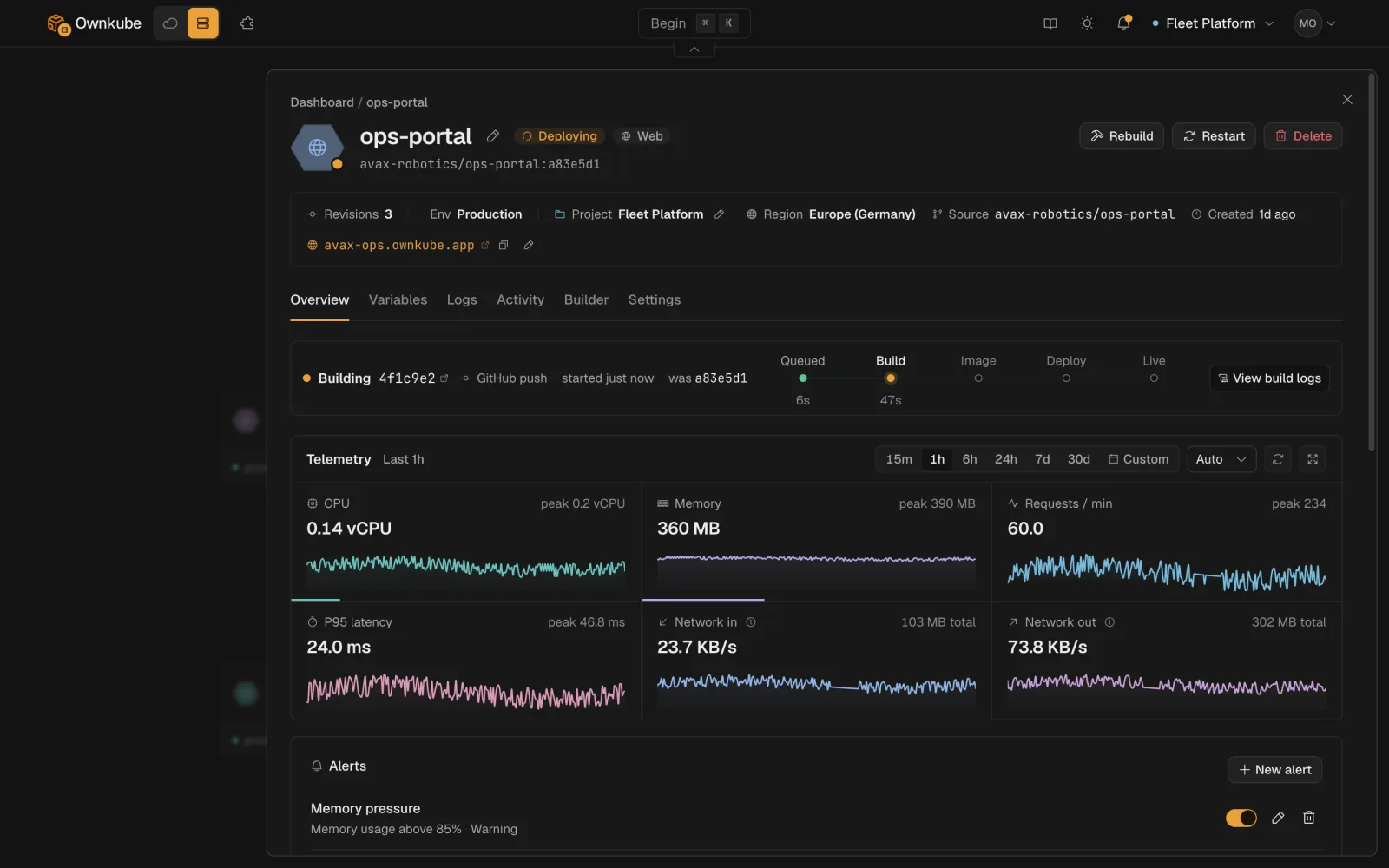 ## Where to look
| Question | Where |
| --- | --- |
| Is it up? | The status pill on the Overview tab and on the dashboard list. See [Status](#status) below. |
| What is it printing? | The **Logs** tab. See [Logs](/docs/observability/logs). |
| Is it busy? | CPU, memory and replica tiles on Overview, plus request rate, p95 latency and network in and out for public web apps. See [Metrics](/docs/observability/metrics). |
| Tell me when it breaks | **Alerts** on Overview: CPU, memory or restart thresholds that email you. See [Alerts](/docs/observability/alerts). |
| What changed and when? | The **Activity** tab: rollouts, rollbacks, config changes, alert firings and who did them. See [Rollbacks and activity](/docs/deployments/rollbacks). |
| How did the build go? | The build log on the **Activity** tab and on each revision. See [Builds and source](/docs/deployments/builds). |
A time picker on the Overview tab (15m, 1h, 6h, 24h or a custom window) is shared by the metrics and the Logs tab, so you can narrow in on an incident once and read everything in that window.
## Status
The status pill tells you the health of the live replicas against what you asked for.
| Status | Meaning |
| --- | --- |
| **Healthy** | Every replica passes its [health checks](/docs/deployments/health-checks) and the live config matches the saved config. |
| **Syncing** | A change is rolling out: new replicas starting, old ones draining. |
| **Degraded** | At least one replica is failing health checks or restarting repeatedly. Check the Logs tab. |
| **Paused** | Replicas set to 0, nothing running. |
| **Asleep** | A [scale to zero](/docs/deployments/sleep) app or datastore parked itself; the next request wakes it. |
| **Deleting** | Being removed. |
During a rollout the status moves through the steps below. If a health check fails, the rollout stops and the previous revision keeps serving.
## Where to look
| Question | Where |
| --- | --- |
| Is it up? | The status pill on the Overview tab and on the dashboard list. See [Status](#status) below. |
| What is it printing? | The **Logs** tab. See [Logs](/docs/observability/logs). |
| Is it busy? | CPU, memory and replica tiles on Overview, plus request rate, p95 latency and network in and out for public web apps. See [Metrics](/docs/observability/metrics). |
| Tell me when it breaks | **Alerts** on Overview: CPU, memory or restart thresholds that email you. See [Alerts](/docs/observability/alerts). |
| What changed and when? | The **Activity** tab: rollouts, rollbacks, config changes, alert firings and who did them. See [Rollbacks and activity](/docs/deployments/rollbacks). |
| How did the build go? | The build log on the **Activity** tab and on each revision. See [Builds and source](/docs/deployments/builds). |
A time picker on the Overview tab (15m, 1h, 6h, 24h or a custom window) is shared by the metrics and the Logs tab, so you can narrow in on an incident once and read everything in that window.
## Status
The status pill tells you the health of the live replicas against what you asked for.
| Status | Meaning |
| --- | --- |
| **Healthy** | Every replica passes its [health checks](/docs/deployments/health-checks) and the live config matches the saved config. |
| **Syncing** | A change is rolling out: new replicas starting, old ones draining. |
| **Degraded** | At least one replica is failing health checks or restarting repeatedly. Check the Logs tab. |
| **Paused** | Replicas set to 0, nothing running. |
| **Asleep** | A [scale to zero](/docs/deployments/sleep) app or datastore parked itself; the next request wakes it. |
| **Deleting** | Being removed. |
During a rollout the status moves through the steps below. If a health check fails, the rollout stops and the previous revision keeps serving.


The same status is available from the terminal with `okctl deploy status ` and from a coding agent through the [MCP server](/docs/mcp).
## Retention
| Plan | Logs and metrics kept for |
| --- | --- |
| Pay as you go | 7 days |
| Personal | 30 days |
| Team | 90 days |
Download logs from the Logs tab if you need to keep them longer.
## Own cloud
If you run in your own AWS account, every page in this section applies to deployments on your cluster, and the cluster page adds node-level telemetry: node count, vCPU, memory and active deployments. See [Clusters](/docs/own-cloud/clusters).
- [Logs](/docs/observability/logs)
- [Metrics](/docs/observability/metrics)
- [Alerts](/docs/observability/alerts)
---
**Don't see a feature you need?** Email [support@ownkube.io](mailto:support@ownkube.io?subject=Feature%20request). Ownkube is shaped by the teams using it and we ship what our users ask for.
## Search
This site has a search endpoint: https://context7.com/api/v2/ask?siteKey=ask_c64dfe8ffaa8d3ad19576838&query=. It returns documentation that answers the question, with a source link for each part. No API key is needed. If nothing matches, it says so.