# Logs
> Every deployment's stdout and stderr, in the Logs tab: search with level and instance filters or a regex, pick a time window, tail live, and download. Also from okctl deploy logs.
Ownkube collects whatever your containers write to standard output and standard error. Open the **Logs** tab on any deployment to read them. There is nothing to configure: log to stdout and it shows up.
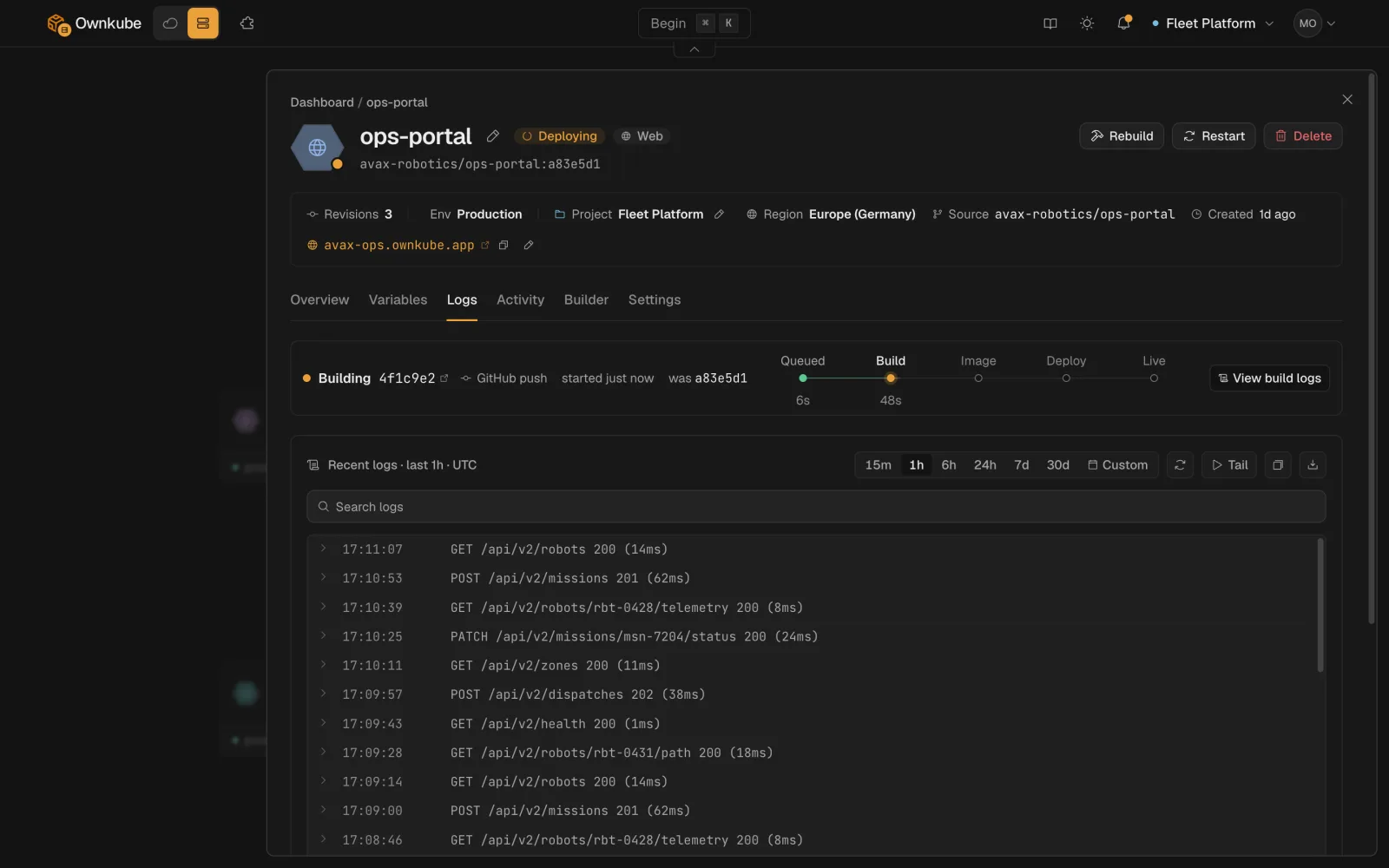 ## Reading the Logs tab
- **Time window.** The picker at the top selects the last 15 minutes, hour, 6 hours or 24 hours, or a custom from and to. It is the same picker the Overview metrics use, so the two stay in step.
- **Search.** Type into the search box to filter the lines in view as you type. Press Enter to run the text as a regular expression against the server for the whole window.
- **Filters.** Narrow by structured fields with `key:value` chips. `level:error` keeps only error lines; `instance:` keeps one replica's output when several are running. The search box suggests keys and example values as you type.
- **Live tail.** The panel loads the selected window once and holds still, so a line does not move out from under you while you read it. Click **Tail** to switch to a live stream; the button reads **Live** while it is on, and clicking again pauses it.
- **Download.** The download button saves the current buffer as a text file.
## Levels
Ownkube detects the level from the line itself: structured JSON with a `level` field, or common prefixes such as `ERROR`, `WARN`, `INFO` and `DEBUG`. Lines it cannot classify get no level and still match plain searches. Writing structured JSON logs gives you the most useful filters.
## From the terminal
```bash
okctl deploy logs # recent lines
okctl deploy logs --range 3600 # the last hour, in seconds
okctl deploy logs --filter "timeout" # lines containing a substring
okctl deploy logs --limit 500 # at most 500 lines
```
Build output is separate from runtime output. Read it with `okctl deploy build-logs `, or from the build entry on the **Activity** tab in the dashboard. See [Builds and source](/docs/deployments/builds).
## Logs on databases and caches
A [Postgres](/docs/data/postgres) or [Valkey](/docs/data/valkey) deployment has the same Logs tab. It shows the engine's own log plus every statement run through the [data console](/docs/data/console), recorded as text with the user who ran it.
## Retention
Logs are kept for 7 days on Pay as you go, 30 days on Personal and 90 days on Team. Download anything you need for longer. See [Plans and pricing](/docs/billing/plans).
## Tips
- Log one event per line. Multi-line stack traces are kept together when the runtime emits them as one record, which most JSON loggers do.
- Do not log secrets. Logs are visible to every member of the organization.
- If a deployment goes **Degraded**, the last few lines before a restart are usually the reason. Filter by `level:error` and set the window to the time of the restart on the Activity tab.
- [Metrics](/docs/observability/metrics)
- [Alerts](/docs/observability/alerts)
- [Shell and SSH](/docs/deployments/shell)
---
**Don't see a feature you need?** Email [support@ownkube.io](mailto:support@ownkube.io?subject=Feature%20request). Ownkube is shaped by the teams using it and we ship what our users ask for.
## Search
This site has a search endpoint: https://context7.com/api/v2/ask?siteKey=ask_c64dfe8ffaa8d3ad19576838&query=. It returns documentation that answers the question, with a source link for each part. No API key is needed. If nothing matches, it says so.
## Reading the Logs tab
- **Time window.** The picker at the top selects the last 15 minutes, hour, 6 hours or 24 hours, or a custom from and to. It is the same picker the Overview metrics use, so the two stay in step.
- **Search.** Type into the search box to filter the lines in view as you type. Press Enter to run the text as a regular expression against the server for the whole window.
- **Filters.** Narrow by structured fields with `key:value` chips. `level:error` keeps only error lines; `instance:` keeps one replica's output when several are running. The search box suggests keys and example values as you type.
- **Live tail.** The panel loads the selected window once and holds still, so a line does not move out from under you while you read it. Click **Tail** to switch to a live stream; the button reads **Live** while it is on, and clicking again pauses it.
- **Download.** The download button saves the current buffer as a text file.
## Levels
Ownkube detects the level from the line itself: structured JSON with a `level` field, or common prefixes such as `ERROR`, `WARN`, `INFO` and `DEBUG`. Lines it cannot classify get no level and still match plain searches. Writing structured JSON logs gives you the most useful filters.
## From the terminal
```bash
okctl deploy logs # recent lines
okctl deploy logs --range 3600 # the last hour, in seconds
okctl deploy logs --filter "timeout" # lines containing a substring
okctl deploy logs --limit 500 # at most 500 lines
```
Build output is separate from runtime output. Read it with `okctl deploy build-logs `, or from the build entry on the **Activity** tab in the dashboard. See [Builds and source](/docs/deployments/builds).
## Logs on databases and caches
A [Postgres](/docs/data/postgres) or [Valkey](/docs/data/valkey) deployment has the same Logs tab. It shows the engine's own log plus every statement run through the [data console](/docs/data/console), recorded as text with the user who ran it.
## Retention
Logs are kept for 7 days on Pay as you go, 30 days on Personal and 90 days on Team. Download anything you need for longer. See [Plans and pricing](/docs/billing/plans).
## Tips
- Log one event per line. Multi-line stack traces are kept together when the runtime emits them as one record, which most JSON loggers do.
- Do not log secrets. Logs are visible to every member of the organization.
- If a deployment goes **Degraded**, the last few lines before a restart are usually the reason. Filter by `level:error` and set the window to the time of the restart on the Activity tab.
- [Metrics](/docs/observability/metrics)
- [Alerts](/docs/observability/alerts)
- [Shell and SSH](/docs/deployments/shell)
---
**Don't see a feature you need?** Email [support@ownkube.io](mailto:support@ownkube.io?subject=Feature%20request). Ownkube is shaped by the teams using it and we ship what our users ask for.
## Search
This site has a search endpoint: https://context7.com/api/v2/ask?siteKey=ask_c64dfe8ffaa8d3ad19576838&query=. It returns documentation that answers the question, with a source link for each part. No API key is needed. If nothing matches, it says so.