# Clusters
> Two cluster shapes for your own AWS account. Starter on one EC2 instance for free, Production on managed EKS for scale. What the cluster page shows and how platform updates work.
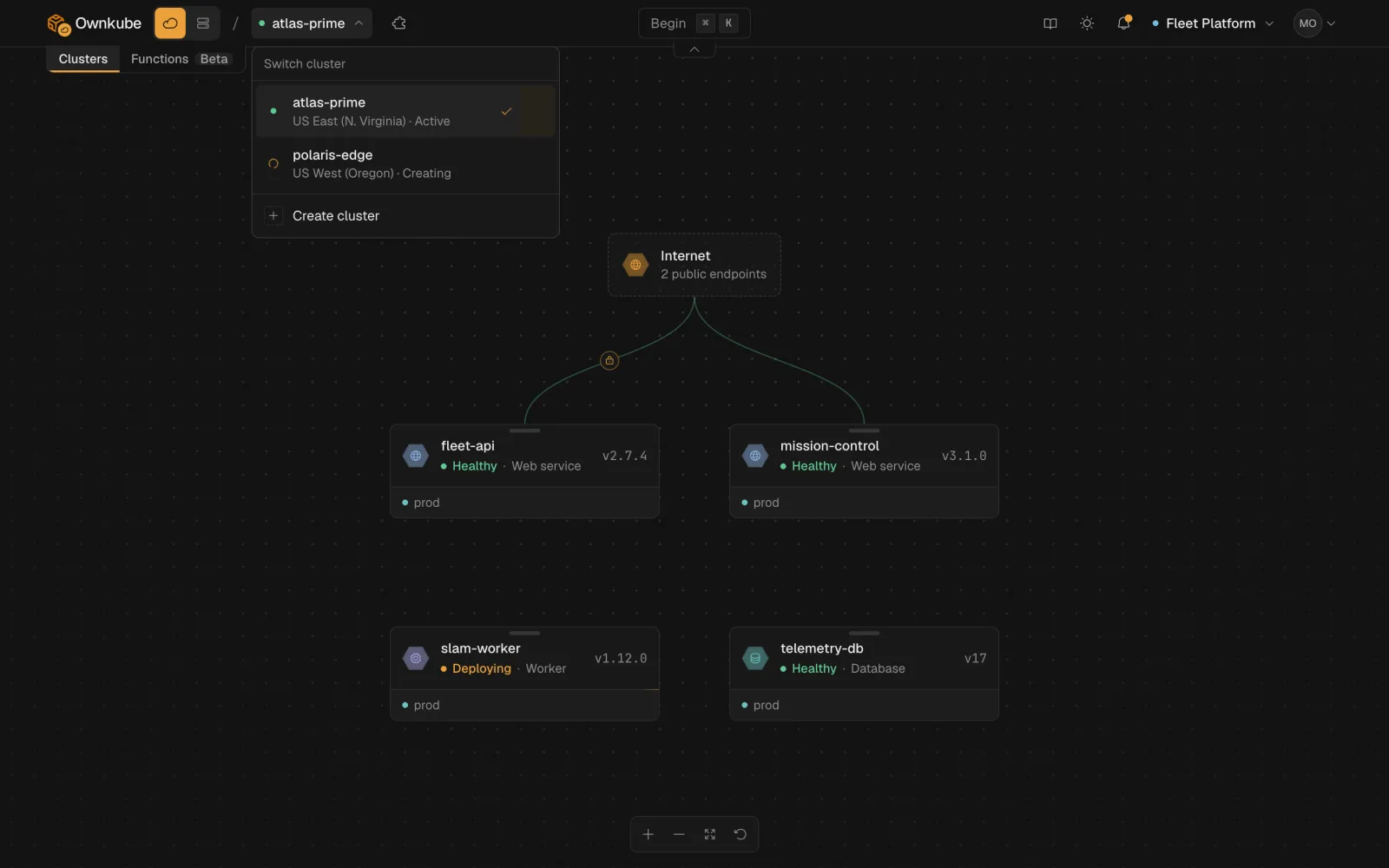
A cluster is the unit of infrastructure you deploy onto in [your own AWS account](/docs/own-cloud). Ownkube provisions two shapes: **Starter**, one EC2 instance that runs everything, and **Production**, managed [EKS](https://aws.amazon.com/eks/) that is highly available across availability zones. Once a cluster is active it appears next to the Compute regions wherever you pick a target.
 ## Choosing a shape
| You want | Pick |
|---|---|
| The cheapest way to run in your own account | **Starter** |
| A dev or staging environment | **Starter** |
| Custom domains or access protection | **Starter** |
| High availability across availability zones | **Production** |
| Node autoscaling from a few vCPUs to hundreds | **Production** |
| To start small and add scale later | **Starter** first, then add a Production cluster |
You can run both at the same time in the same organization. A cluster cannot change shape after creation; create a new one and [copy deployments](/docs/deployments/environments#promote-between-environments) across.
## Starter
A single EC2 instance runs every app, worker, job, database and cache you deploy to it. There is **no Ownkube fee**; you pay AWS for the instance.
- One EC2 instance, your choice of size, with a public IP
- 50 GiB of gp3 storage
- Automatic HTTPS on an `ownkube.app` hostname per web app, plus [custom domains](/docs/own-cloud/custom-domains)
- [Access protection](/docs/own-cloud/access-protection) for public web apps
- Managed Postgres (single instance, backups archived to an S3 bucket in your account) and Valkey
| Instance | vCPU | Memory | EC2 cost (approximate, as of October 2026) | Comfortably runs |
|---|---|---|---|---|
| `t3.medium` | 2 | 4 GiB | \$30 a month | 1 to 2 apps and a small database |
| `t3.large` | 2 | 8 GiB | \$60 a month | 2 to 3 apps and a database |
| `t3.xlarge` | 4 | 16 GiB | \$120 a month | 4 to 6 apps and 1 to 2 databases |
| `t3.2xlarge` | 8 | 32 GiB | \$240 a month | 8 to 12 apps and 2 to 3 databases |
Check current prices on the [EC2 pricing page](https://aws.amazon.com/ec2/pricing/on-demand/).
## Production
Managed EKS, highly available across availability zones. Ownkube provisions a VPC, subnets, the EKS control plane and a workload node group that scales with your deployments.
- Managed control plane, run by AWS
- Node autoscaling: grows to fit your deployments, shrinks when idle
- Managed Postgres with standby replicas, backups and point-in-time recovery
- Load balancing and automatic HTTPS for public web apps
- Platform updates on your schedule or in an automatic weekly window
**Pricing** is metered on the vCPU and memory your deployments **request**, not on the nodes:
- \$5 per vCPU a month
- \$1 per GiB RAM a month
- Pro-rated per second from the first second, charged to your [wallet](/docs/billing/usage)
AWS bills you directly for the control plane, instances, NAT and load balancer at its standard rates. There is no markup.
**Sizing.** In the **Compute** step of the wizard you pick a starting capacity: **Workload vCPUs** (2 to 128, default 8) and **Memory** (4 to 256 GiB, default 16). The node pool scales above that floor on its own. Change the floor from the cluster page at any time.
**Region and version.** Any of the 17 supported [AWS regions](https://aws.amazon.com/about-aws/global-infrastructure/regions_az/). Pick the Kubernetes version at creation time from the three most recent releases on the [upstream schedule](https://kubernetes.io/releases/).
## The cluster page
Every cluster has a page in your [dashboard](https://app.ownkube.io/dashboard) with these sections.
**Overview.** Live status checks (**Control plane reachable**, **Cluster services healthy**, **Network connected**, and the autoscaler), region, deployment count, and node, vCPU and memory telemetry. On Production, **Worker groups** lets you add dedicated node pools with their own labels, taints and instance types, and **Nodes** lists every label and taint on the cluster's nodes.
**Automation.** The **Automatic updates** toggle. On, with the default setting, updates apply as soon as a safe one is ready. Set a weekly window and they apply only inside it.
**Networking.** The VPC ID and address ranges chosen at creation, plus the cluster's public endpoint.
**Settings.** Time zone (used for job schedules and update windows), telemetry retention, and on Starter the **Certificate verification** card for [custom domains](/docs/own-cloud/custom-domains).
**Danger zone.** **Destroy cluster** removes the cluster and every cloud resource it created. It is blocked while deployments exist and asks you to type the cluster name.
## Platform updates
Each cluster runs a **cluster platform version**: the routing, certificate, metrics and networking components Ownkube installs. When a new version ships, the cluster page shows it with a summary of what changed.
- With **Automatic updates** on, the cluster applies it, either immediately or in your weekly window.
- With automatic updates off, apply it yourself from the cluster page. Updates are forward-only.
Updates roll out without taking your workloads down: components restart one at a time behind the load balancer and every path is tested before it reaches your cluster. Some features carry a minimum platform version, for example [access protection](/docs/own-cloud/access-protection) and [custom domains](/docs/own-cloud/custom-domains); the dashboard tells you when an update unlocks one.
## From the CLI
```bash title="Terminal"
okctl clusters list
okctl clusters get
okctl clusters status # live provisioning status
okctl clusters create --name staging --account --region eu-central-1 --type starter
okctl clusters create --name prod --account --region eu-central-1 --type production --vcpu 8 --memory 16
okctl clusters cancel # abort an in-flight creation
okctl clusters delete
```
See the [command reference](/docs/cli/commands#own-cloud) for every flag.
- [Create a cluster](/docs/own-cloud/create-cluster)
- [Connect your AWS account](/docs/own-cloud/connect-aws)
- [Deployments](/docs/deployments)
---
**Don't see a feature you need?** Email [support@ownkube.io](mailto:support@ownkube.io?subject=Feature%20request). Ownkube is shaped by the teams using it and we ship what our users ask for.
## Search
This site has a search endpoint: https://context7.com/api/v2/ask?siteKey=ask_c64dfe8ffaa8d3ad19576838&query=. It returns documentation that answers the question, with a source link for each part. No API key is needed. If nothing matches, it says so.
## Choosing a shape
| You want | Pick |
|---|---|
| The cheapest way to run in your own account | **Starter** |
| A dev or staging environment | **Starter** |
| Custom domains or access protection | **Starter** |
| High availability across availability zones | **Production** |
| Node autoscaling from a few vCPUs to hundreds | **Production** |
| To start small and add scale later | **Starter** first, then add a Production cluster |
You can run both at the same time in the same organization. A cluster cannot change shape after creation; create a new one and [copy deployments](/docs/deployments/environments#promote-between-environments) across.
## Starter
A single EC2 instance runs every app, worker, job, database and cache you deploy to it. There is **no Ownkube fee**; you pay AWS for the instance.
- One EC2 instance, your choice of size, with a public IP
- 50 GiB of gp3 storage
- Automatic HTTPS on an `ownkube.app` hostname per web app, plus [custom domains](/docs/own-cloud/custom-domains)
- [Access protection](/docs/own-cloud/access-protection) for public web apps
- Managed Postgres (single instance, backups archived to an S3 bucket in your account) and Valkey
| Instance | vCPU | Memory | EC2 cost (approximate, as of October 2026) | Comfortably runs |
|---|---|---|---|---|
| `t3.medium` | 2 | 4 GiB | \$30 a month | 1 to 2 apps and a small database |
| `t3.large` | 2 | 8 GiB | \$60 a month | 2 to 3 apps and a database |
| `t3.xlarge` | 4 | 16 GiB | \$120 a month | 4 to 6 apps and 1 to 2 databases |
| `t3.2xlarge` | 8 | 32 GiB | \$240 a month | 8 to 12 apps and 2 to 3 databases |
Check current prices on the [EC2 pricing page](https://aws.amazon.com/ec2/pricing/on-demand/).
## Production
Managed EKS, highly available across availability zones. Ownkube provisions a VPC, subnets, the EKS control plane and a workload node group that scales with your deployments.
- Managed control plane, run by AWS
- Node autoscaling: grows to fit your deployments, shrinks when idle
- Managed Postgres with standby replicas, backups and point-in-time recovery
- Load balancing and automatic HTTPS for public web apps
- Platform updates on your schedule or in an automatic weekly window
**Pricing** is metered on the vCPU and memory your deployments **request**, not on the nodes:
- \$5 per vCPU a month
- \$1 per GiB RAM a month
- Pro-rated per second from the first second, charged to your [wallet](/docs/billing/usage)
AWS bills you directly for the control plane, instances, NAT and load balancer at its standard rates. There is no markup.
**Sizing.** In the **Compute** step of the wizard you pick a starting capacity: **Workload vCPUs** (2 to 128, default 8) and **Memory** (4 to 256 GiB, default 16). The node pool scales above that floor on its own. Change the floor from the cluster page at any time.
**Region and version.** Any of the 17 supported [AWS regions](https://aws.amazon.com/about-aws/global-infrastructure/regions_az/). Pick the Kubernetes version at creation time from the three most recent releases on the [upstream schedule](https://kubernetes.io/releases/).
## The cluster page
Every cluster has a page in your [dashboard](https://app.ownkube.io/dashboard) with these sections.
**Overview.** Live status checks (**Control plane reachable**, **Cluster services healthy**, **Network connected**, and the autoscaler), region, deployment count, and node, vCPU and memory telemetry. On Production, **Worker groups** lets you add dedicated node pools with their own labels, taints and instance types, and **Nodes** lists every label and taint on the cluster's nodes.
**Automation.** The **Automatic updates** toggle. On, with the default setting, updates apply as soon as a safe one is ready. Set a weekly window and they apply only inside it.
**Networking.** The VPC ID and address ranges chosen at creation, plus the cluster's public endpoint.
**Settings.** Time zone (used for job schedules and update windows), telemetry retention, and on Starter the **Certificate verification** card for [custom domains](/docs/own-cloud/custom-domains).
**Danger zone.** **Destroy cluster** removes the cluster and every cloud resource it created. It is blocked while deployments exist and asks you to type the cluster name.
## Platform updates
Each cluster runs a **cluster platform version**: the routing, certificate, metrics and networking components Ownkube installs. When a new version ships, the cluster page shows it with a summary of what changed.
- With **Automatic updates** on, the cluster applies it, either immediately or in your weekly window.
- With automatic updates off, apply it yourself from the cluster page. Updates are forward-only.
Updates roll out without taking your workloads down: components restart one at a time behind the load balancer and every path is tested before it reaches your cluster. Some features carry a minimum platform version, for example [access protection](/docs/own-cloud/access-protection) and [custom domains](/docs/own-cloud/custom-domains); the dashboard tells you when an update unlocks one.
## From the CLI
```bash title="Terminal"
okctl clusters list
okctl clusters get
okctl clusters status # live provisioning status
okctl clusters create --name staging --account --region eu-central-1 --type starter
okctl clusters create --name prod --account --region eu-central-1 --type production --vcpu 8 --memory 16
okctl clusters cancel # abort an in-flight creation
okctl clusters delete
```
See the [command reference](/docs/cli/commands#own-cloud) for every flag.
- [Create a cluster](/docs/own-cloud/create-cluster)
- [Connect your AWS account](/docs/own-cloud/connect-aws)
- [Deployments](/docs/deployments)
---
**Don't see a feature you need?** Email [support@ownkube.io](mailto:support@ownkube.io?subject=Feature%20request). Ownkube is shaped by the teams using it and we ship what our users ask for.
## Search
This site has a search endpoint: https://context7.com/api/v2/ask?siteKey=ask_c64dfe8ffaa8d3ad19576838&query=. It returns documentation that answers the question, with a source link for each part. No API key is needed. If nothing matches, it says so.