# Security
> Isolated, encrypted infrastructure on Ownkube-hosted compute. In your own cloud, a control plane in our cloud and a data plane in yours.
Ownkube is built so your code and data stay protected however you run. On **Ownkube-hosted compute**, your apps run in isolated, encrypted infrastructure Ownkube operates, with per-organization scoping. When you run in **your own AWS account**, your code, data, and runtime stay inside your VPC, and the Ownkube control plane only ever receives configuration intent.
## On Ownkube-hosted compute
### Isolation
Each organization's workloads are scoped and isolated. Members only see resources their organization owns.
### Encryption everywhere
Data is encrypted at rest and in transit with TLS on every hop.
### Secrets protected
Secret env vars are encrypted at rest and masked everywhere in the UI, decrypted only into the runtime secret store.
### No lock-in
Standard containers built from your repo or image. Move the same app to your own AWS account with no rewrite, and take it elsewhere the same way.
## In your own cloud
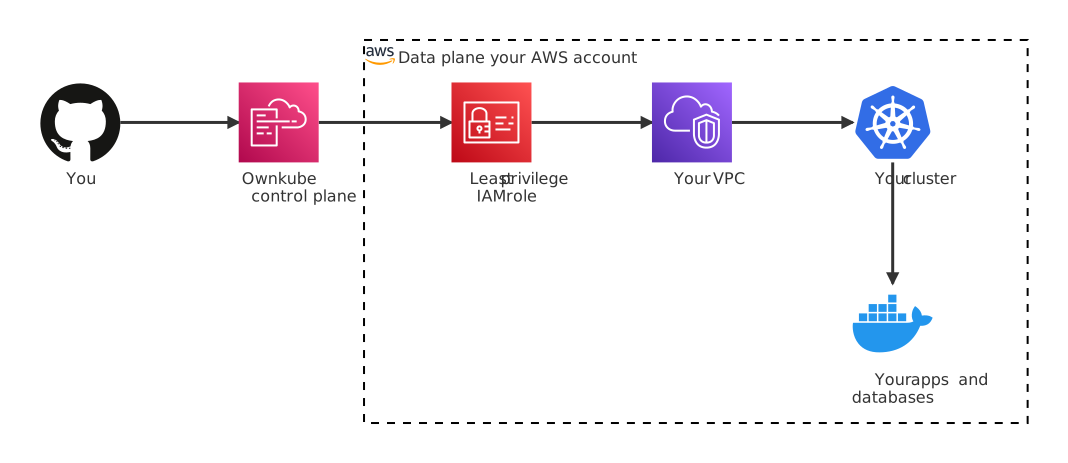
When you connect your own AWS account, Ownkube is designed so your code, data, and runtime stay inside it. The control plane in our cloud only receives **configuration intent**. The actual workloads, databases, logs, and traffic all live with you.
### Least-privilege IAM
A single scoped-down IAM role in your account. No access keys stored, no root credentials ever used.
### No data egress
Application traffic, request bodies, database rows, and logs never leave your VPC.
### Encryption everywhere
At rest with AWS KMS keys in your account. In transit with TLS on every hop.
### Disconnect anytime
Remove the IAM role and your cluster keeps running. You own the VPC, the nodes, and the data.
### Control plane vs data plane
- **Control plane (Ownkube)** stores cluster metadata, deployment configuration, user accounts, billing. Never receives your application's traffic or data.
- **Data plane (your AWS account)** runs every container, every database, every load balancer, every TLS certificate. All data stays here.
### How the AWS connection works
When you [connect your AWS account](/docs/own-cloud/connect-aws), a [CloudFormation](https://docs.aws.amazon.com/cloudformation/) stack creates a single IAM role with:
- A **trust policy** that only lets Ownkube's AWS account assume it, and only with a [**unique external ID**](https://aws.amazon.com/blogs/security/how-to-use-external-id-when-granting-access-to-your-aws-resources/) generated for your account
- **Scoped-down permissions** limited to what Ownkube needs: EKS, EC2, VPC, CloudFormation, S3 for state, IAM role-passing, ACM, DNS, Elastic Load Balancing, ECR
No long-lived AWS credentials are stored in Ownkube's database. Every action uses short-lived [STS](https://docs.aws.amazon.com/STS/latest/APIReference/welcome.html) credentials obtained by assuming the role with the external ID.
### Data handling
| Data type | Where it lives | What Ownkube sees |
|---|---|---|
| Application code | Your container registry | Nothing (Ownkube pulls it to your cluster) |
| Application traffic | Your cluster's load balancer | Nothing |
| Request bodies, responses | Your cluster | Nothing |
| Database rows | Inside your cluster | Nothing |
| Environment variables | Your cluster's secret store, encrypted at rest | Encrypted reference only |
| Container logs | Inside your cluster | Nothing |
| Deployment config | Ownkube database (encrypted) | Yes: image, env var **keys** (values encrypted), scale, probes |
**Environment variable values** marked as Secret are encrypted at rest in Ownkube's database and masked everywhere in the UI. They're decrypted only when being pushed into the cluster's secret store, which itself is encrypted at rest with [AWS KMS](https://docs.aws.amazon.com/kms/).
### Compliance posture
Because everything runtime lives in your AWS account, your compliance scope mirrors whatever you already have with AWS.
- **SOC 2**: audit scope stays on your AWS account and internal processes
- **HIPAA**: keep your BAA with AWS directly; application data never leaves your account
- **GDPR**: data residency is determined by the region you pick when you create a cluster
- **ISO 27001**: scope stays under your organization's program
Ownkube itself maintains standard operational controls for the control plane. If you need documentation for your own audits, [reach out](mailto:support@ownkube.io?subject=Compliance).
### Standard, non-proprietary infrastructure
Ownkube provisions standard AWS resources inside your VPC: EC2 instances, EKS clusters, Elastic Load Balancing, S3 buckets for state, ACM certificates, DNS records. No proprietary APIs, no custom runtimes.
If you disconnect Ownkube, all of those resources are standard AWS things you can continue to manage directly.
### Disconnect anytime
Remove the IAM role (or delete the CloudFormation stack) and Ownkube loses access. **Nothing gets torn down.** Your clusters keep running, your databases keep serving traffic, your TLS keeps renewing. AWS handles all of that. Reconnecting is a three-minute flow.
"Disconnect" means Ownkube stops managing. It does **not** delete your resources, but it also means Ownkube can't help you if something goes wrong until you reconnect. For genuine decommissioning, delete the clusters first from the dashboard while still connected.
## Security practices
Authentication and sessions
Email + OAuth (GitHub, Google) for users. Sessions are short-lived. Organization-scoped access: members only see resources their organization owns.
CLI and MCP access
The [`okctl` CLI](/docs/cli) and the [MCP server](/docs/mcp) sign in through the browser with OAuth; there is no long-lived key to paste into a config file or leak from one. A session is scoped to one organization and carries the same role as the user who approved it. Sign out with `okctl auth logout`, or revoke the connector from your MCP client.
Activity trail
Every deploy, rollback, scale change, variable update and restart is recorded with who did it and when, and shows on the deployment's **Activity** tab. Cluster and account changes are recorded the same way. Dashboard, CLI and MCP actions all go through the same API, so they are logged identically.
Roles
Owners and admins run destructive, billing and credential operations. Members deploy, configure, restart, roll back, and read logs and metrics. See [Organizations](/docs/organizations#roles).
Vulnerability response
Responsible disclosure welcome at [support@ownkube.io](mailto:support@ownkube.io?subject=Security). We triage within one business day.
- [Connect your AWS account](/docs/own-cloud/connect-aws)
- [Organizations](/docs/organizations)
- [How it works](/docs/how-it-works)
---
**Don't see a feature you need?** Email [support@ownkube.io](mailto:support@ownkube.io?subject=Feature%20request). Ownkube is shaped by the teams using it and we ship what our users ask for.
## Search
This site has a search endpoint: https://context7.com/api/v2/ask?siteKey=ask_c64dfe8ffaa8d3ad19576838&query=. It returns documentation that answers the question, with a source link for each part. No API key is needed. If nothing matches, it says so.