
How it works
Ownkube runs your apps on infrastructure it owns and operates. You push a repo or a container, Ownkube builds and deploys it, and you get a live URL with managed Postgres, automatic TLS, logs, metrics, autoscaling, and rollbacks built in. You pay Ownkube for what you use. No cloud account, no cluster to provision.
When you want your own data boundary or your own bill, the same app moves into your own AWS account with the same workflow and dashboard, and its logs, metrics, and health checks come with it. That path is covered near the end of this page.
The deployment flow
Section titled “The deployment flow”-
Connect a source
Connect a GitHub or GitLab repository, or point Ownkube at a container image in a registry (or a public image). See Registries.
-
Ownkube builds
For source deployments, Ownkube builds the image (with or without a Dockerfile) in its build capacity and stores the result. Container deployments skip this step.
-
Ownkube deploys
Pick a tag in the create-deployment flow from your dashboard, set the port and environment variables, and Ownkube rolls it out. Rolling updates, health checks, and zero-downtime rollouts are handled for you.
-
You get a live URL
Every web deployment gets a ready-to-share hostname on a Cloudflare-backed domain, with automatic TLS and DDoS, bot, and scrape protection out of the box.
Every config change (new image tag, env var update, autoscaling change) triggers a rolling update. New containers start and pass health checks before old containers receive traffic or terminate. A bad rollout is a one-click rollback to the last healthy revision.
What runs where
Section titled “What runs where”| Component | Where it runs | Who owns it |
|---|---|---|
| Your applications | Ownkube-operated infrastructure | You, deployed by Ownkube |
| Your databases | Ownkube-operated infrastructure | You, managed by Ownkube |
| Functions (beta) | Ownkube-operated, tied to an account + region | You |
| Container images | Your registry (GitHub-built, or a public image) | You |
| Secrets + env vars | Encrypted secret store | You, encrypted at rest |
| User accounts + billing | Ownkube control plane | Ownkube |
Observability is built in
Section titled “Observability is built in”Every deployment ships with a live log stream, CPU and memory metrics, and health and sync status, on Ownkube-managed compute and in your own cloud alike. There is nothing to wire up: the dashboard and the CLI read the same signals wherever the app runs.
Run the same app in your own cloud
Section titled “Run the same app in your own cloud”When you want your own data boundary, your own bill, or a compliance scope that stays on your account, the same app runs inside your own AWS account. This is an option, not a requirement, and most personal software never needs it. AWS is supported today, with GCP and Azure coming soon.
In this mode, Ownkube acts as a control plane that provisions and manages Kubernetes infrastructure inside your AWS account, and you pay AWS directly. Same dashboard, same workflow, same observability.
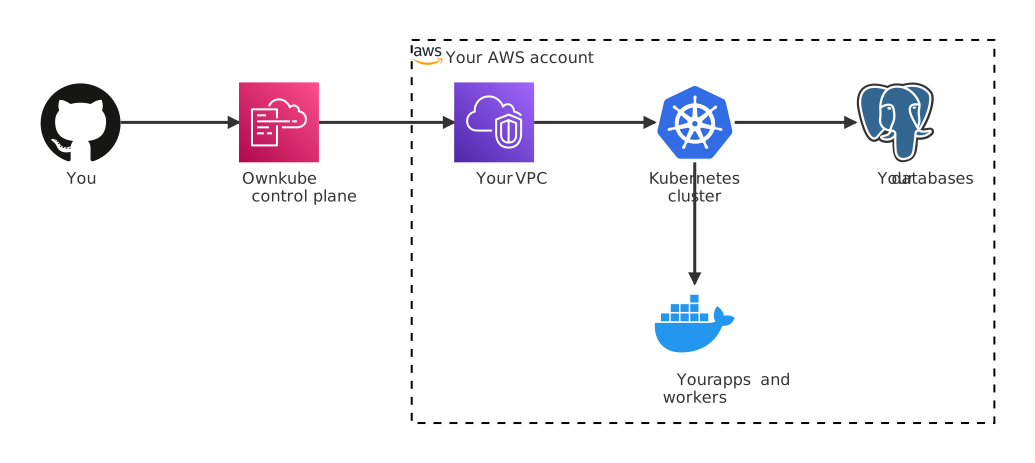
The control plane only ever receives configuration intent: “deploy this image, with these env vars, at this scale”. The actual rollout happens through a role Ownkube assumes in your AWS account. Application data, logs, and runtime state stay inside your VPC.
The trust model in your own cloud
Section titled “The trust model in your own cloud”Least-privilege IAM
Connecting your account runs a CloudFormation stack that creates a single IAM role scoped to operations Ownkube actually performs: EKS, EC2, VPC, IAM role-passing, CloudFormation, S3, and a handful of read-only describe actions. No admin access, no access keys. Ownkube assumes it via a unique external ID.
No data egress
Ownkube never receives application data, logs, request bodies, or database rows from your account. The control plane only handles configuration and status. Every runtime byte stays in your VPC.
Encryption everywhere
Data is encrypted at rest (AWS KMS) and in transit (TLS). Secrets in env vars are stored in the cluster’s Kubernetes secret store, never in the Ownkube database in plaintext.
Vanilla infrastructure, disconnect anytime
Your cluster is standard Kubernetes, with no proprietary APIs or custom runtimes. Remove Ownkube’s IAM role and your cluster keeps running: you own the VPC, the cluster, the nodes, and the data. Ownkube stops managing; it doesn’t take anything down.