
 Abhishek Jaiswal
The best Fly.io alternatives in 2026 are Ownkube, Railway, Render, Northflank and DigitalOcean App Platform. Ownkube is the closest fit if what hurts is the cost of a small app with a database: managed Postgres starts at $4 a month, and the whole bill runs from a prepaid wallet. Railway is the fastest path from repo to URL, Render suits steady services at flat prices, and Northflank suits teams that want Kubernetes power. Fly.io is still the strongest choice for apps that need to sit close to users on several continents, so this post also covers when to stay.
Our picks
| If you want | Pick |
|---|---|
| A small app plus managed Postgres on a small budget | Ownkube |
| The fastest repo-to-URL setup and a big template catalog | Railway |
| A few steady services at flat, readable prices | Render |
| Kubernetes power, GPU and job runners without running a cluster | Northflank |
| To stay next to your existing DigitalOcean resources | DigitalOcean App Platform |
| Low latency on several continents | Stay on Fly.io |
The Fly.io alternatives at a glance
Prices are approximate list prices from each provider’s pricing page, as of October 2026.
| Alternative | Billing model | Smallest service | Managed Postgres | Regions | Best for |
|---|---|---|---|---|---|
| Ownkube | Prepaid wallet, metered per minute or a flat box per app | Metered from cents, or a Spark 1 box at $5 a month | From $4 a month plus $0.25 per GB | Mumbai and Germany | Personal software and small teams who want a bounded bill |
| Railway | Metered per second, postpaid | Whatever it uses, from cents | Metered service | Several, US, EU and Asia | Fast setup and templates |
| Render | Workspace plan plus flat instances, postpaid | $7 a month (0.5 CPU, 512 MB) | From $6 a month | Several, US, EU and Asia | Steady services |
| Northflank | Per-second compute, postpaid | $2.70 a month (0.1 shared vCPU, 256 MB) | Yes | Several, plus your own cloud | Platform teams |
| DigitalOcean App Platform | Flat container tiers, postpaid | $5 a month | From $15.15 a month | Several | DigitalOcean users |
| Fly.io | Machines per second while running, postpaid | $2.19 a month (shared-cpu-1x, 256 MB) | Managed from $38 a month | Dozens | Global apps |
Why people look for a Fly.io alternative
Managed Postgres changes the math. A shared-cpu-1x Machine with 512 MB is $3.69 a month, which is cheap. Fly’s managed Postgres starts around $38 a month, so a small app with a database lands near $44 before egress. Running Postgres yourself on a Machine is cheaper and puts backups and failover on you. We worked the numbers in Fly.io pricing explained.
More moving parts than a small app needs. Machines, volumes pinned to one host, fly.toml, IPv4 add-ons, per-region egress rates and a separate support plan are all reasonable for a global app. For a single-region side project they are surface area to learn and watch.
The bill arrives after the usage. Fly bills postpaid. A Machine that stays up, or egress from a busy region at $0.12 per GB, shows up on the next invoice.
Support is a paid plan. Community support is free; Standard support is $29 a month and Premium $199.
The alternatives, one by one
Ownkube
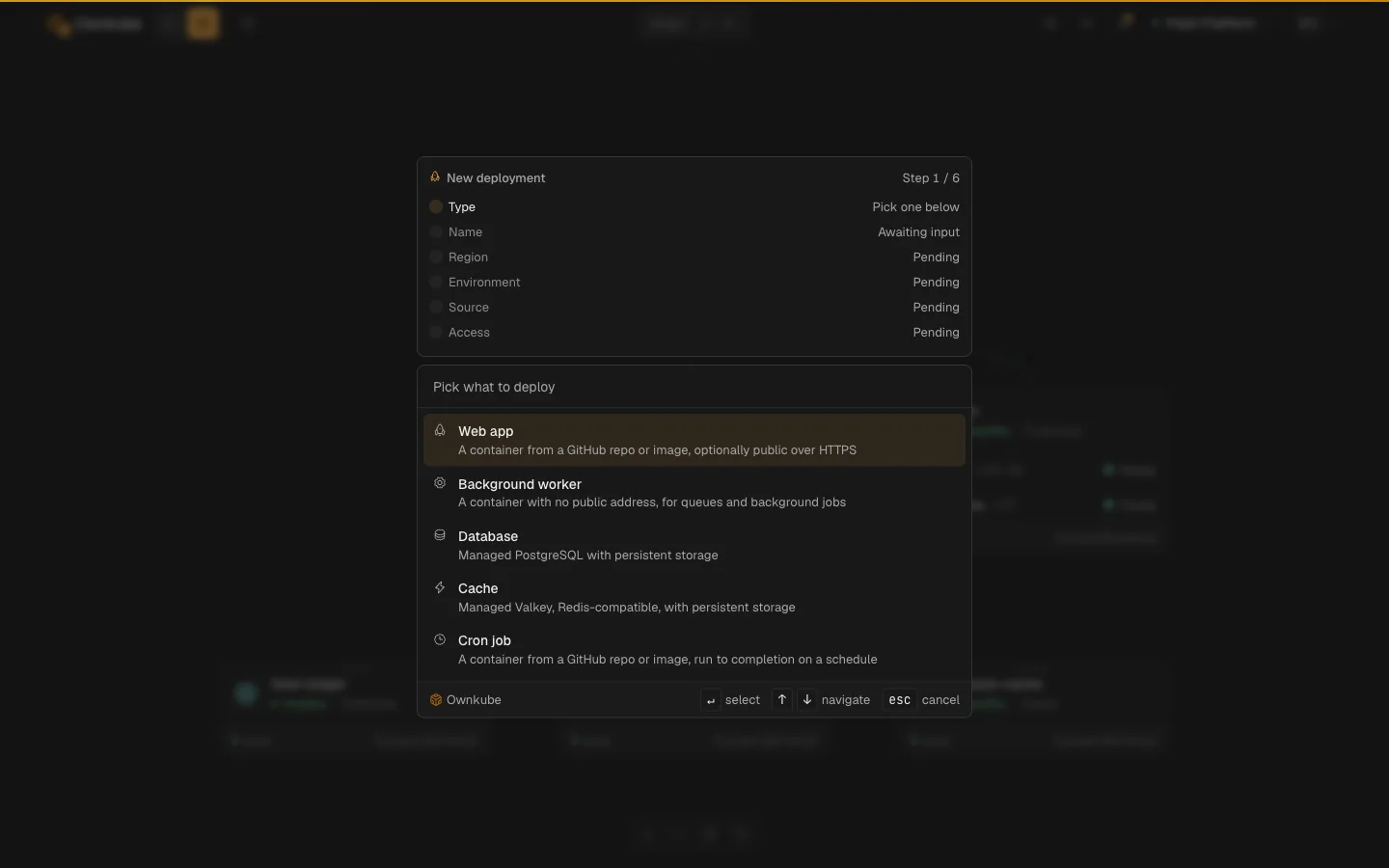
Ownkube is a cloud for personal software. You deploy web apps, background workers, cron jobs, Postgres and a Valkey cache onto Ownkube Compute with no cloud account and no config file. Pick what to deploy, point it at a GitHub or GitLab repo or an image, and it gets an *.ownkube.app hostname with TLS.
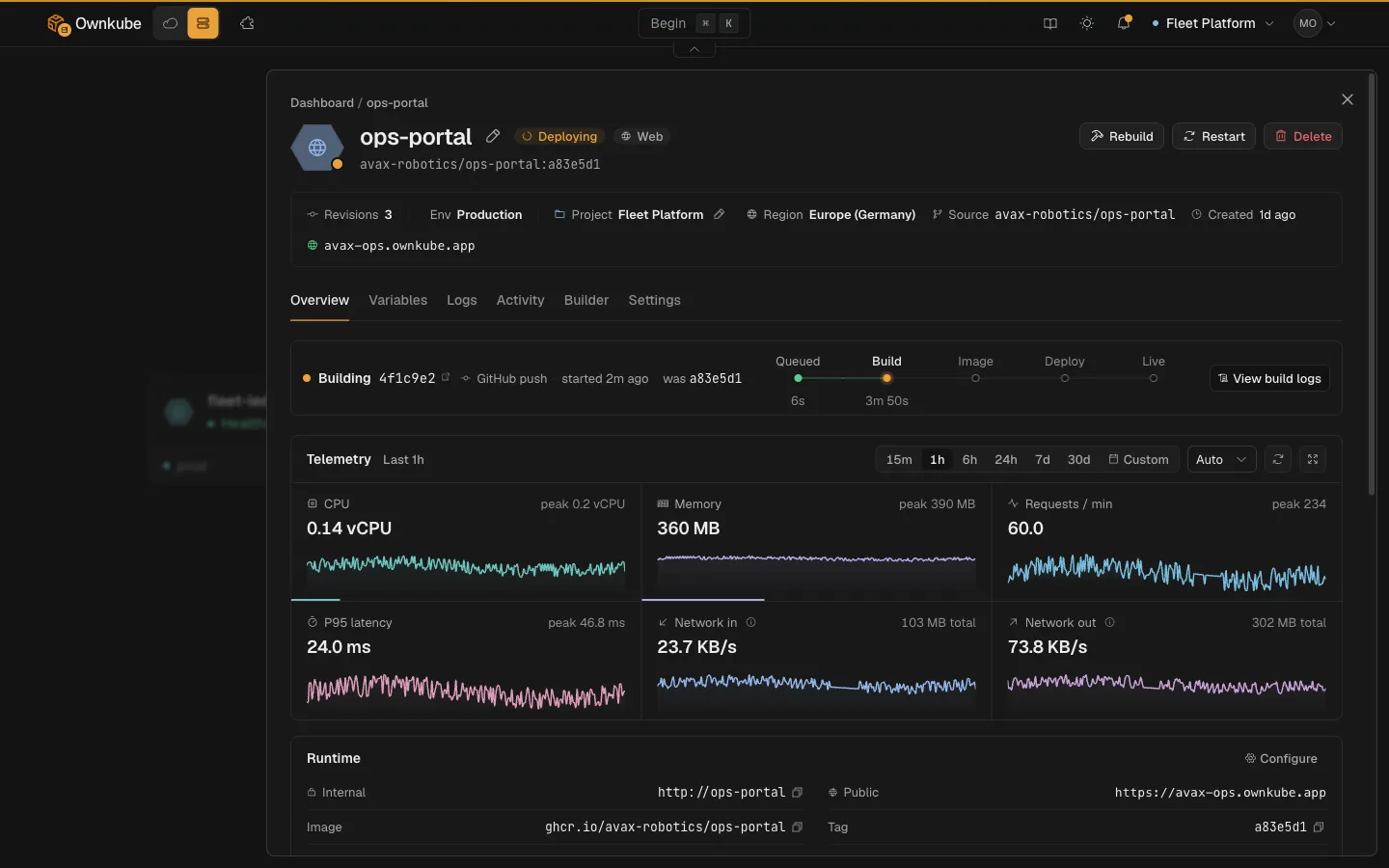
The small app with a database that costs about $44 on Fly comes to about $8.50 on Ownkube in the Germany region: the app meters per minute on what it uses, and Postgres runs on a database box from $4 a month plus $0.25 per GB of storage. Personal and Team plans include 7-day backups with point-in-time restore. Every app ships with logs, CPU and memory metrics, request rates and P95 latency.
Billing is a prepaid wallet: Pay as you go starts with a $5 top-up, Personal ($5 a month) and Team ($20 a month) load credit each month, and unused credit never expires. Idle web apps, databases and caches can sleep; a sleeping app meters nothing and a sleeping database bills only storage.
The trade-offs are real. Ownkube Compute runs in two regions (Mumbai and Germany), so it is a poor fit for an app that has to be close to users everywhere. There is no GPU, and custom domains are not on Compute yet. When an app has to move into your own or a customer’s AWS account, the same app ships there with no rewrite, with its logs, metrics and health checks.
Railway
Railway meters CPU and memory per second and has one of the best onboarding flows in the category. Postgres runs as a metered service in your project, so a small app with a database lands around $18 a month. See Railway vs Fly.io.
Render
Render charges a flat price per instance plus a workspace plan. A 512 MB service is $7, Postgres starts at $6 for 256 MB, and the free Postgres expires after 30 days. Good for services that run busy all day.
Northflank
Northflank bills per second, supports GPU and job runners, and lets platform teams run it in their own cloud. Expect more configuration than Fly, with more control in return.
DigitalOcean App Platform
Flat tiers from $5 a month and managed databases from about $15. The natural pick if your other infrastructure is already on DigitalOcean.
Fly.io vs Ownkube
| Ownkube | Fly.io | |
|---|---|---|
| Billing | Prepaid wallet, per minute | Postpaid, per second |
| Small app | Metered from cents, or Spark 1 at $5 | shared-cpu-1x 512 MB at $3.69 |
| Managed Postgres | From $4 a month plus $0.25 per GB | From $38 a month |
| Cache | Valkey from $2 a month | Bring your own |
| Idle apps | Sleep, meter nothing | Autostop, stopped Machines bill root disk |
| Egress | Germany $0.02 per GB, Mumbai $0.13 per GB | $0.02 to $0.12 per GB by region |
| Regions | 2 | Dozens |
| Custom domains | Not on Compute yet | Yes |
| Config | Dashboard, CLI or a coding agent | fly.toml and the CLI |
Fly.io figures are approximate, as of October 2026.
When to stay on Fly.io
Stay if your users are spread across continents and latency matters, since Fly’s region count is the thing no alternative here matches. Stay if you like configuration as code and a CLI-first workflow, or if your app runs as a single tiny process where $2 to $4 a month is already the whole bill. Stay if you need a custom domain on every app today.
A quick checklist before you switch
- Map where your traffic comes from and check that one or two regions cover it.
- Price the app with its database and cache, since that is where the bills diverge.
- Export Postgres with
pg_dumpand test the restore. - Move secrets into environment variables on the new platform before cutover.
- Keep the Fly app running until the new one has served real traffic for a day.
FAQ
What is the cheapest Fly.io alternative with managed Postgres?
On the small-app example above, Ownkube comes to about $8.50 a month in the Germany region against about $44 on Fly with managed Postgres. Render’s 256 MB Postgres at $6 is also cheap, though its free database expires after 30 days.
Does Ownkube need a fly.toml or a Dockerfile?
No config file is needed. Ownkube builds from a GitHub or GitLab repo with automatic build, and uses your Dockerfile if you have one.
Can I deploy from my coding agent the way I use flyctl?
Yes. Paste one line into Claude Code, Cursor or another coding agent, sign in when it asks, and it deploys through the Ownkube MCP server and the okctl CLI. See connect your agent.
Reference: for the side-by-side breakdown, see Ownkube vs Fly.io in the docs.
Where Ownkube fits
Move off Fly.io when the database bill or the moving parts cost more than the global reach gives you. Stay when reach is the point. Ownkube is built for personal software and small teams: ship in seconds, run Postgres from $4 a month, and keep the credit you do not spend. Deploy my first app.
Abhishek Jaiswal · Founder and Engineer
Abhishek Jaiswal is the founder and engineer behind Ownkube, a cloud for personal software. He builds the platform and writes here about cloud cost, migrations, and running production infrastructure in your own AWS account without a DevOps team.