

On this page 8 sections
Moving an app off Railway takes four steps: export its variables, redeploy the same repo on Ownkube Compute, restore Postgres from a pg_dump, and switch traffic once the new copy has served real requests. The code stays as it is. If it builds on Railway, it builds on Ownkube, with or without a Dockerfile.
Most small apps move in an afternoon, and the Railway service keeps running until you turn it off.
TL;DR
- Export the service’s variables with
railway variables --kvand drop the ones Railway generates. - Dump the Railway Postgres with
pg_dump -Fc. - Deploy the same repo on Ownkube Compute, add the variables, create a Postgres and link it to the app.
- Restore the dump over a private tunnel with
okctl connect. - Check the app on its
*.ownkube.apphostname, switch traffic, then turn Railway off.
Before you start
Make a short list of what the Railway project holds. Each piece has a direct match:
| On Railway | On Ownkube |
|---|---|
| A service built from a GitHub repo | A web app built from the same repo |
| A service with no public domain | A background worker |
| A cron schedule | A cron job |
| The Postgres service | A managed Postgres, from $4 a month plus $0.25 per GB |
| A Redis service | A Valkey cache, from $2 a month |
| Service variables | App variables, with a secret flag per value |
A *.up.railway.app domain | An *.ownkube.app hostname with TLS |
Check two things first. Ownkube Compute runs in two regions (Mumbai and Germany), so confirm one of them is close enough to your users. Custom domains are also not on Compute yet, so if your users reach the app on your own domain, plan for that before cutover (more in step 5).
Step 1: Export your Railway variables
From the project directory, with the Railway CLI linked to the service you are moving:
railway variables --kv > railway.envOpen railway.env and delete what Railway generates for you: RAILWAY_* variables, internal service references and the database URL. Ownkube injects a fresh DATABASE_URL when you link the new database. Keep application secrets, third-party API keys and feature flags.
Step 2: Dump the Railway Postgres
Take the connection string from the Postgres service’s Variables tab (the public DATABASE_PUBLIC_URL, since you are connecting from your laptop) and dump it in Postgres’s custom format:
pg_dump "$RAILWAY_DATABASE_URL" --no-owner --no-privileges -Fc -f railway.dumpThis is a trial copy. You will take a final dump during cutover so no writes are lost in between. If the app stores uploads on a Railway volume, copy them to object storage such as S3 now and point the app at the bucket.
Step 3: Deploy the same app on Ownkube Compute
In the dashboard, create a web app, connect your GitHub or GitLab account and pick the repo and branch. Ownkube detects the language and builds it, or uses your Dockerfile when there is one. Every push to that branch redeploys.
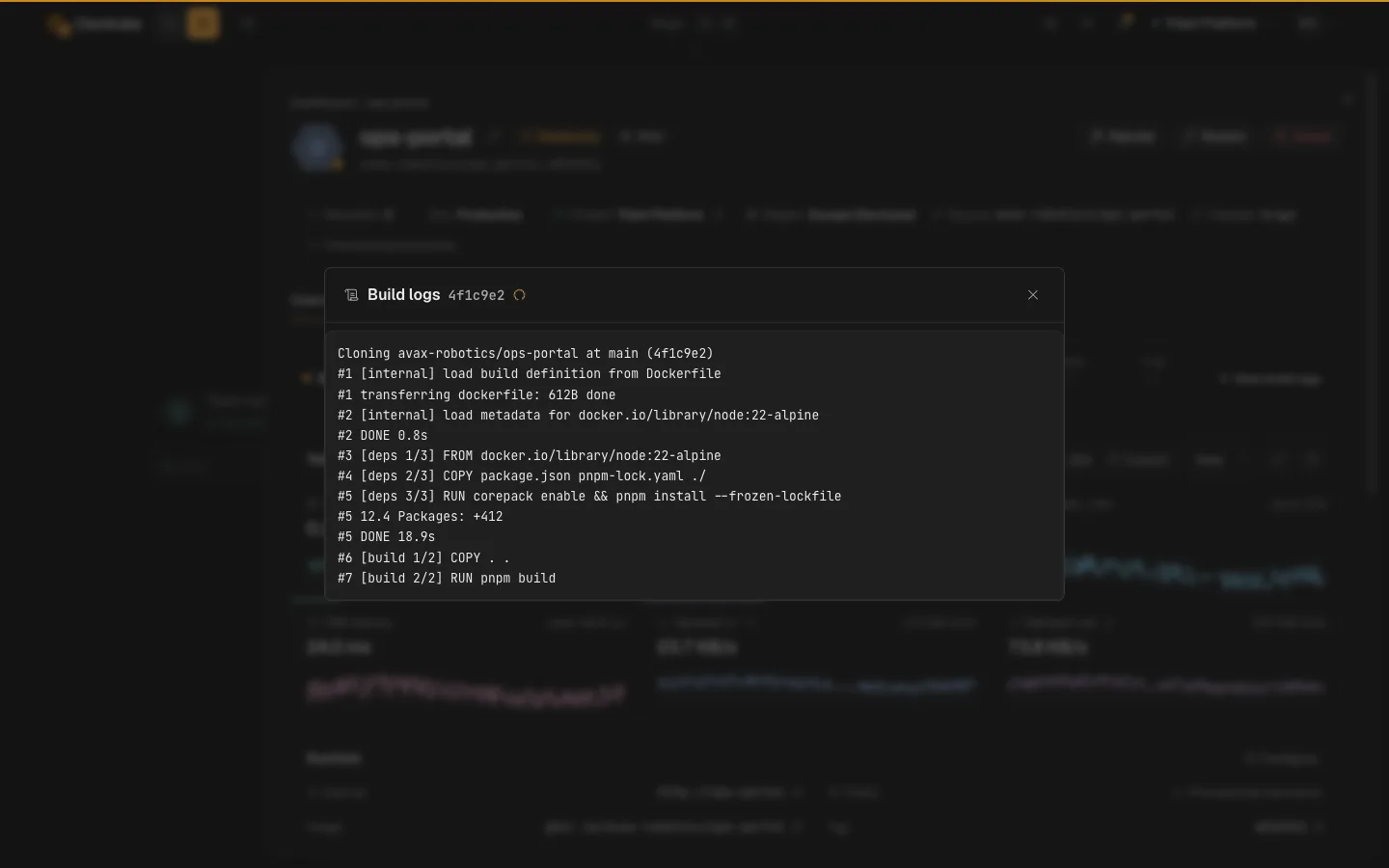
You can also deploy straight from the checkout with the CLI. The first okctl up creates the app and links the directory, and every later run redeploys it:
okctl up --name api --port 8080Then add the variables you kept. Plain values go in as pairs, and secrets given as bare names are prompted for with hidden input so they stay out of your shell history:
okctl vars set api NODE_ENV=production LOG_LEVEL=infookctl vars set api STRIPE_SECRET_KEY SESSION_SECRET --secretThe app’s Variables tab does the same thing if you would rather paste from the file.
Each app either meters CPU and memory per minute on what it uses or sits on a flat box, and you can switch later. See metered vs reserved pricing for how to choose.
Step 4: Create the database and restore the dump
Add a database from the same canvas, then link it to the app. Linking injects DATABASE_URL into the app, so the code that read Railway’s variable reads Ownkube’s with no change. Personal and Team plans add 7-day backups with point-in-time restore.
Open a private tunnel to the new database. It prints a local connection string and stays open until you press Ctrl+C:
okctl connect db --tunnel-only --port 15432In a second terminal, restore into it using the printed string:
pg_restore --no-owner --no-privileges -d "$TUNNEL_DATABASE_URL" railway.dumpThe database stays private the whole time, so there is no public endpoint to remember to close afterwards. Check row counts on a few tables and run the queries your app leans on. If Railway also ran a Redis for you, add a Valkey cache and link it the same way, which injects REDIS_URL.
Step 5: Verify, cut over and turn Railway off
Open the app on its *.ownkube.app hostname and use it the way a customer would: sign in, write something, read it back. The app page shows the build, logs and live CPU, memory, request and latency metrics, which is the quickest way to spot a missing variable.
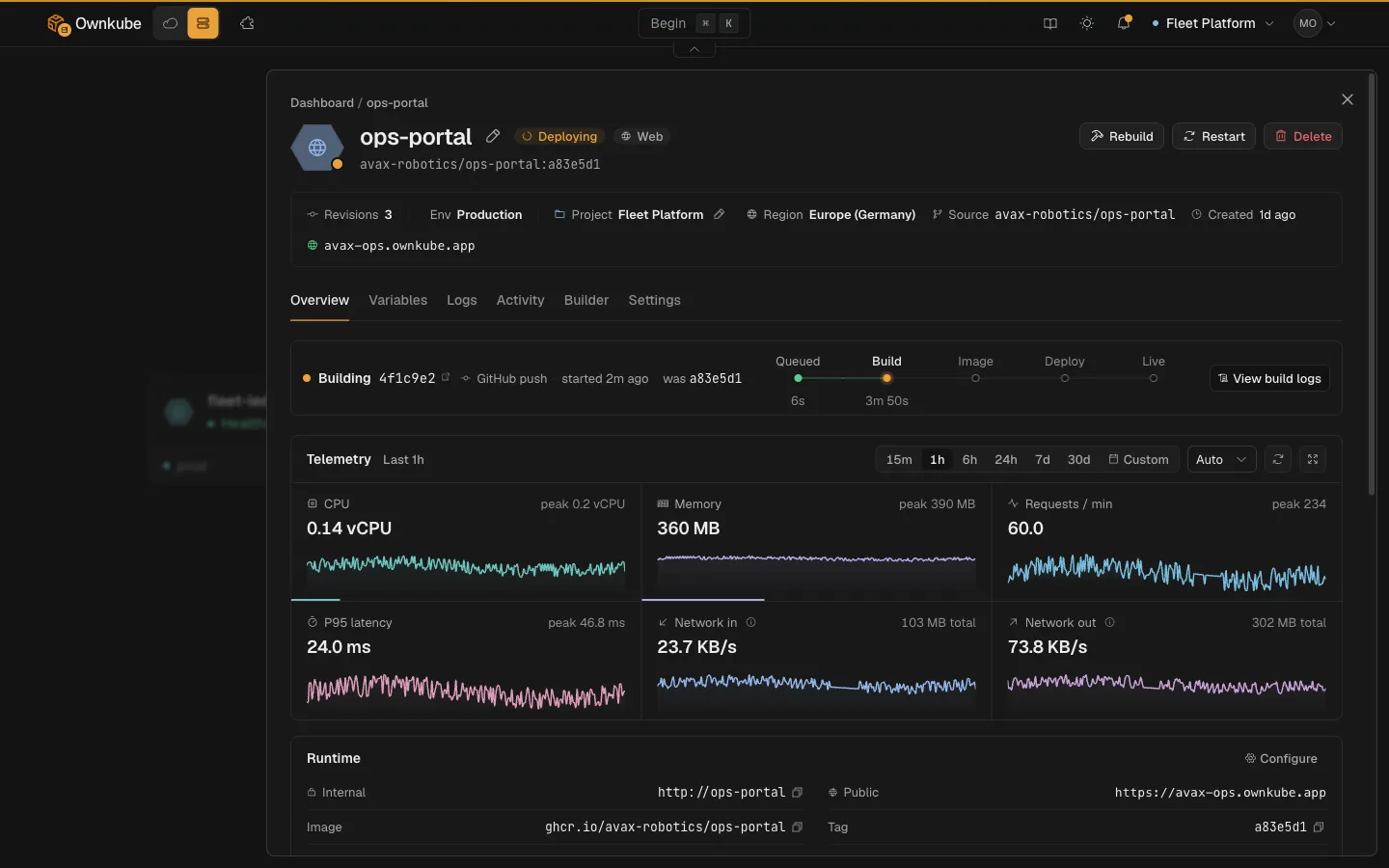
When it looks right, run the final cutover:
- Put the Railway app into maintenance mode, or stop its writes, for a few minutes.
- Take a final
pg_dumpand restore it into the Ownkube database the same way. - Point traffic at the Ownkube hostname: update links, OAuth callback URLs, webhooks and any API clients.
- Watch logs and metrics until requests settle on the new app.
- Keep the Railway service paused for a day or two as a rollback path, then delete it so it stops billing.
If your users reach the app on your own domain today, that domain keeps pointing at Railway until you are ready, since custom domains are not on Compute yet. Many apps can move their API, workers and database first and keep the public domain where it is for now.
FAQ
Do I need a Dockerfile to move off Railway?
No. Ownkube builds straight from a GitHub or GitLab repo with automatic build, the way Railway does, and uses your Dockerfile when there is one.
Can I move my Railway Postgres data?
Yes. Dump it with pg_dump -Fc from Railway and restore it with pg_restore into a managed Postgres on Ownkube, over a private okctl connect tunnel. Run it once as a trial and once more at cutover.
Do I need an AWS account to leave Railway?
No. Ownkube Compute runs your app with no cloud account to set up. You load a prepaid wallet (Pay as you go starts with a $5 top-up), usage draws it down per minute, and unused credit never expires.
What happens to my Railway cron jobs and workers?
A service with a cron schedule becomes a cron job on Ownkube, and a service with no public domain becomes a background worker. Both build from the same repo and read the same variables.
Can the app move into my own AWS account later?
Yes. When an app has to run inside your own or a customer’s AWS account, the same app moves there with no rewrite, and its logs, metrics and health checks come with it.
For the step-by-step version, see Migrate from Railway in the docs, and Railway alternatives if you are still choosing where to go.
Where Ownkube fits
Migrate off Railway when the postpaid meter or the monthly credit reset is what costs you. The move is a redeploy of the same repo plus a database restore, and Railway keeps running until you are sure. Ownkube is built for personal software and small teams: ship in seconds, load a wallet instead of exposing a card, and keep the credit you do not spend. Deploy my first app.