Skip to content

Configuration reference

Every deployment is configured from one form, with different fields by resource type. This page is the exhaustive reference. For the tour, see Deployments; for the walkthrough, Create a deployment.

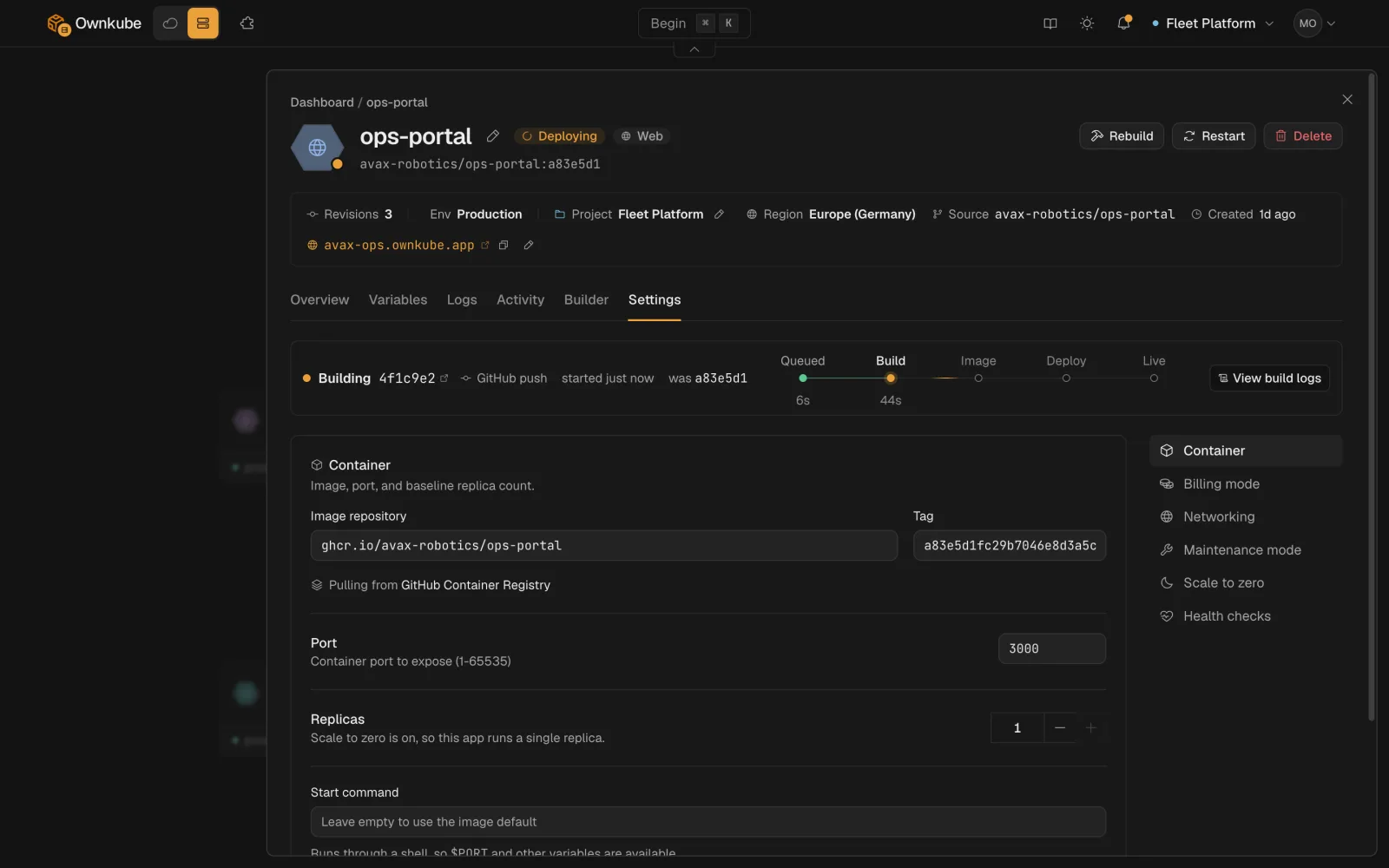
Every field is editable after creation from the deployment’s Settings tab (variables on Variables, build settings on Builder). Saving creates a revision and rolls it out.

Screenshot of a web app's Settings tab with source, port, resources, scaling and health check sections
FieldTypeDefaultRules
NametextnoneLowercase letters, numbers and dashes; starts with a letter; up to 63 characters. Unique within the environment. Required.
Projectselectthe default projectA project in the organization. Movable later with Move.
EnvironmentselectnoneAn environment such as Development or Production. Required.
RegionselectnoneAsia (Mumbai) or Europe (Germany). Fixed after creation. See Regions.

Web apps, workers and jobs run a container image from one of two sources. See Builds and source.

FieldTypeDefaultNotes
RepositorypickernoneFrom the repositories on your connected GitHub or GitLab account.
Branchtextrepository defaultEvery push to this branch builds and deploys.
Root directorytextrepository rootFolder to build from, for monorepos. On the Builder tab.
Build argumentslistnoneKEY=value pairs passed to the build. On the Builder tab.
Builder sizeselectStandardSmall (0.25 vCPU, 1 GB), Standard (0.5 vCPU, 2 GB), Large (Team). On the Builder tab.

Web apps and workers share the same fields. A web app is reached over HTTP, usually through a public hostname; a worker runs in the background and stays private.

FieldTypeDefaultRange
Portnumbernone1 to 65535. Required. The port the container listens on.
Replicasnumber10 to 20. 0 pauses the deployment without deleting it. Ignored when autoscaling is on.
FieldTypeDefaultNotes
Public hostnametoggleon for web apps, off for workersAllocates a <name>.ownkube.app hostname with a managed TLS certificate. See Public hostnames and TLS.
Subdomaintextderived from the nameThe label under ownkube.app. Change it with Edit next to the hostname or okctl deploy subdomain set.
FieldTypeDefaultNotes
Billing modeselectMeteredMetered bills CPU and memory actually used, per minute. Reserved box bills a flat monthly rate for a Spark or Core box. See Plans and pricing.
CPU requestquantity15mSet by Ownkube on Ownkube Compute. On your own cloud, the guaranteed floor and the baseline autoscaling measures against. 1000m is one vCPU.
Memory requestquantity128MiSet by Ownkube on Ownkube Compute. On your own cloud, guaranteed memory.
CPU limitquantity500mThe ceiling the container cannot exceed. On Ownkube Compute, the baseline autoscaling measures against.
Memory limitquantity512MiThe container is restarted if it exceeds this.
BoxselectSpark 1With Reserved box: Spark 1 to 3, or Core 2 to 8 and the memory variants on Personal and Team.

Tier caps apply across the organization: 2 vCPU and 4 GiB on Pay as you go, 8 vCPU and 16 GiB on Personal, 32 vCPU and 64 GiB on Team. Services that can sleep count once, at the largest one’s size; see how the limits count.

FieldTypeDefaultRange
Enable autoscalingtoggleoff
Min replicasnumber11 to 100, at most Max replicas
Max replicasnumber31 to 100, at least Min replicas
Target CPU utilizationpercent801 to 100. Of the CPU limit on Ownkube Compute, of the CPU request on your own cloud.
Target memory utilizationpercent801 to 100, of the memory request. Own cloud only: Ownkube Compute sizes memory automatically.

See Autoscaling.

FieldTypeDefaultRange
Sleep when idletoggleoffNeeds a public hostname and a single replica without autoscaling.
Idle before sleepminutes51 to 60

See Sleep and wake.

Three independent probes, each off by default. When on, each takes the same fields.

FieldTypeDefaultRange
Pathtext/healthnon-empty
Periodseconds101 to 300
Timeoutseconds51 to 60
Failure thresholdcount31 to 30
Initial delayseconds00 to 300

Startup gates how long a container has to boot, liveness restarts it when it fails, readiness holds traffic until it passes. See Health checks.

Shown only when the deployment is public, and only on an own-cloud Starter cluster. See Access protection.

FieldTypeDefaultNotes
Require a passwordtoggleoffHTTP basic auth with a Username (no spaces or colons) and Password.

A job runs a container to completion and exits. It has no port, replicas, hostname, autoscaling, sleep or access protection. Jobs share Source, Resources and Variables with web apps and add the fields below. See Scheduled jobs.

FieldTypeDefaultRange
Commandlistimage entrypointup to 64 entries
Argumentslistimage defaultup to 64 entries
FieldTypeDefaultNotes
ActivetoggleonOff suspends the schedule; Run now still works.
Cron expressiontextnoneStandard five-field cron or an @macro such as @daily. Empty makes the job one-off.
Overlapping runsselectForbidAllow, Forbid (skip while the previous run is going) or Replace (cancel it).
Time zonetextUTCAn IANA zone such as Asia/Kolkata.
Start deadlinesecondsnone0 to 86400. How late a run may start before it is skipped.
Keep successful runscountnone0 to 100
Keep failed runscountnone0 to 100
FieldTypeDefaultRange
On failureselectNeverNever (keep the failed container for inspection) or OnFailure (retry in place).
Retry limitnumbernone0 to 20
Run timeoutsecondsnone1 to 86400
Clean up aftersecondsnone0 to 604800
Parallel tasksnumber11 to 20
Completionsnumber11 to 20

A managed Postgres deployment. Databases have no port, replicas, autoscaling, probes or variables of their own; apps get the connection string by linking. See Postgres.

FieldTypeDefaultNotes
Versionselect18Postgres 17 or 18. Set at creation.
BoxselectDB 0.5DB 0.5 to DB 16, or DB 4 to DB 16 Dedicated (Team). Pay as you go goes up to DB 2.
Storageselect10 GiB1, 5, 10, 20, 50 or 100 GiB. Can grow, never shrink.
Standby replicasnumber0Up to 2 on Team. Each standby bills as another database box.
BackupstoggleoffDaily backups with 7-day point-in-time recovery on Personal and Team. Toggling restarts the database.
Public accesstoggleoffA stable public hostname with its own TLS certificate. Needed for the data console and external clients.
Sleep when idletoggleoffNeeds public access on. Storage still bills while asleep.
Database nametextfrom the deployment nameA valid Postgres identifier. Set at creation.
Owner roletextfrom the deployment nameSet at creation.

A managed Valkey deployment. See Valkey cache.

FieldTypeDefaultNotes
VersionselectlatestThe Valkey version.
BoxselectCache 0.25Cache 0.25 to Cache 4, by memory. Pay as you go goes up to Cache 1.
Max memoryquantitythe box sizeThe limit Valkey evicts against.
Eviction policyselectallkeys-lruAny standard Valkey policy such as volatile-lru or noeviction.
Public accesstoggleoffA public rediss:// endpoint with TLS. Needed for the data console.
Sleep when idletoggleoffA sleeping cache bills nothing.

The cache password is generated and cannot be changed.

  • Revisions. Every change is a revision with a field-level diff on the Activity tab. See Rollbacks and activity.
  • Secrets. A variable marked Secret is masked in the UI and redacted from the activity diff. Saving a secret with a blank value keeps the stored value.
  • Rolling updates. New containers pass health checks before old ones stop.
  • Roles. Members can edit configuration, variables and scaling. Deleting, changing billing mode and revealing credentials need an owner or admin. See Organizations and roles.