
Builds and source
A web app, worker or job runs a container image. Ownkube can build that image from a GitHub or GitLab repository on every push, or run an image you already publish. This page covers both and the build settings on the Builder tab.
Connect GitHub or GitLab
Section titled “Connect GitHub or GitLab”Connections live under Version control in Settings. Only organization owners and admins can connect a provider. Ownkube builds from GitHub through a GitHub App, so you grant access to exactly the repositories you choose and no personal token is stored. GitLab connects with OAuth against your GitLab account.
-
Open Settings
Go to Settings and open the Version control section.
-
Install the Ownkube GitHub App
Click Connect GitHub, pick the account or organization, and choose All repositories or a list of specific ones. GitHub returns you to Ownkube with the connection active.
-
Deploy
Connected repositories appear in the repository picker when you create a deployment.
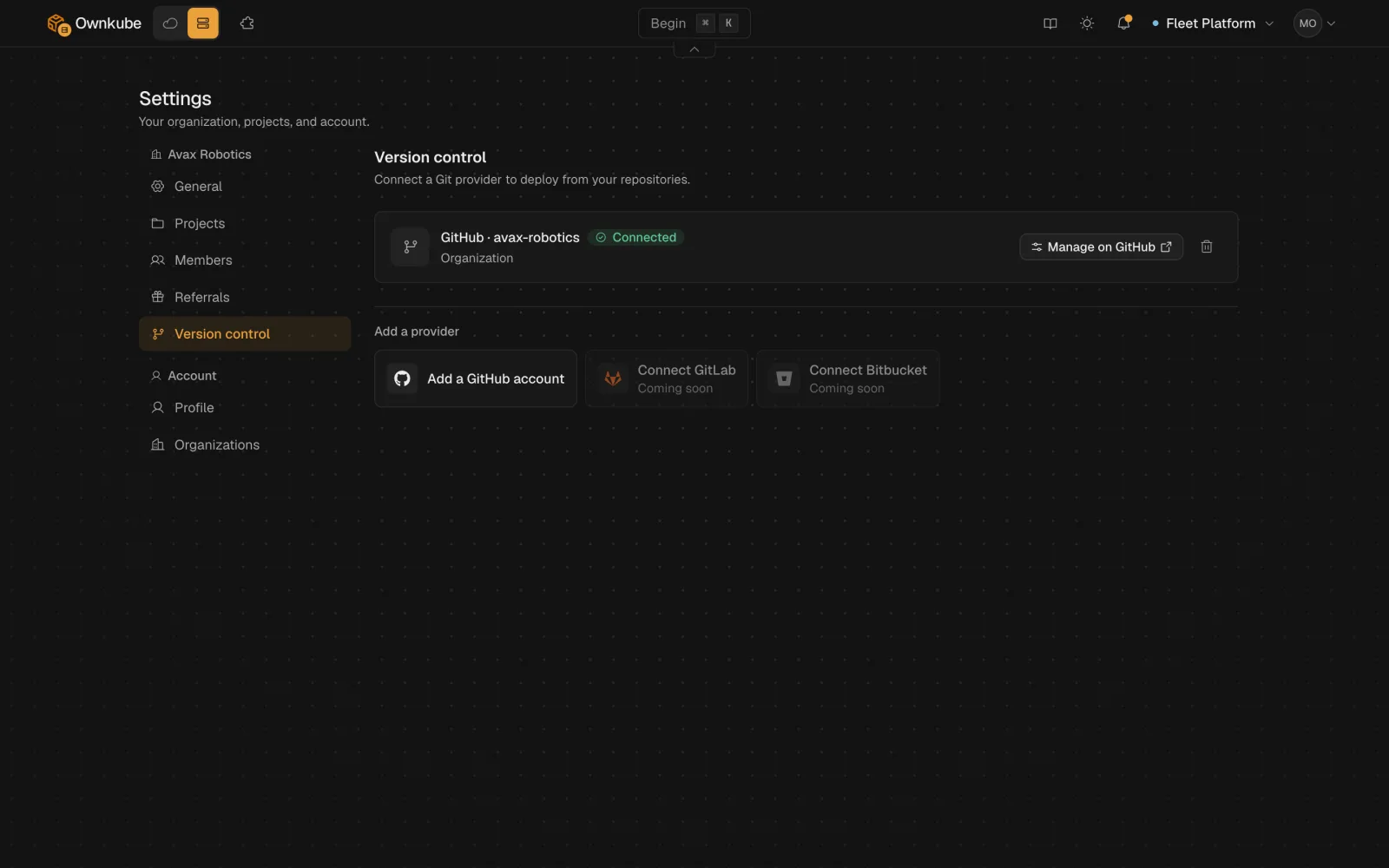
To change which GitHub repositories are shared, use Configure next to the connection; it opens the installation page on GitHub. The GitHub App can be installed on more than one account or organization, and each deployment remembers which connection it builds from.
GitLab
Section titled “GitLab”Click Connect GitLab on the same tab. GitLab asks you to authorize Ownkube and returns you to Settings with the connection active; repositories you can access then appear in the picker. Pushes to a deployment’s branch build the same way as GitHub pushes.
Removing a connection stops future builds but leaves running deployments as they are. Bitbucket is not supported yet; deploy from an image instead.
Dockerfile or automatic build
Section titled “Dockerfile or automatic build”If the repository (or the root directory you set) on either provider contains a Dockerfile, Ownkube builds with it. You control the base image, the build steps and the start command. This is the right choice for anything with system dependencies or a custom runtime.
Without a Dockerfile, the automatic build detects the language and framework from the repository (package.json, requirements.txt, go.mod, Gemfile, composer.json, pom.xml and so on), installs dependencies, runs the build step and produces an image. The framework guides note what each detector expects.
Either way, the result is an image stored by Ownkube and rolled out as a new revision. Every push to the deployment’s branch triggers a build; to rebuild the same commit, use Rebuild on the Builder tab or okctl deploy rebuild.
The Builder tab
Section titled “The Builder tab”| Setting | What it does |
|---|---|
| Root directory | The folder inside the repository to build from. Set it for monorepos, for example apps/api. |
| Build arguments | KEY=value pairs passed to the build as Docker build arguments. Use variables for anything the running app needs; build arguments are only visible at build time. |
| Builder size | Small (0.25 vCPU, 1 GB), Standard (0.5 vCPU, 2 GB, the default) or Large (Team plan). Pick Large for heavy compiles such as Rust or a large Next.js app. |
The same settings are available from the CLI as okctl deploy build-context, okctl deploy build-args and okctl deploy builder-size. See CLI commands.
Build minutes and limits
Section titled “Build minutes and limits”Builds run on Ownkube’s build capacity and are counted in wall-clock minutes, regardless of builder size. Personal includes 300 build minutes a month and Team includes 1,500; Pay as you go bills from the first minute. A single build is capped at 30 minutes (15 on Pay as you go). Rates are on Plans and pricing.
Use an existing image
Section titled “Use an existing image”Choose Use an existing image when creating a deployment and enter the image reference and tag, such as ghcr.io/owner/app:1.2.0 or docker.io/library/nginx:1.27. Public images need no connection. Pin a tag rather than latest so every revision maps to a known build.
Deploying a new version is a tag change on the Settings tab, or okctl deploy update from the terminal.